Articles by "Pc Package"
Showing posts with label Pc Package. Show all posts
Tech Touchz is a Network about Hacker News, Tech News &Tech Hacks - Latest &Tech News, Hacker News and Hacking Tricks About Technology

You can still upgrade your PC/laptop to Windows 10 for free using this workaround

Windows 10 offer
Windows 10 offer has ended and yet you can upgrade your PC for free
Microsoft officially ended its free Windows 10 upgrade offer to Windows 7/8.1 users on 29th July and starting 30th July, the upgrade to Window 10 will set you back by $119 onwards. Now there are plenty of users who forgot to upgrade their PCs before 29th or just let it pass due to indecision.

If you have missed Microsoft’s free upgrade bus and would like to upgrade your PC/laptop for free, there is a workaround. Apparently the very day, Microsoft closed its free upgrade offer on 29th July, it opened another offer for users with assistive technologies on their PC/laptop.

According to Microsoft’s latest offer, Windows 10 can be installed free of charge by those who are using assistive technologies. The loophole here is that Microsoft isn’t checking your PC/laptop in any way to find out whether such features are in place or not. As a result, everyone can upgrade to Windows 10 without paying the $119.

“For the general public, the free upgrade offer for Windows 10 ends on July 29. However, if you use assistive technologies, you can still get the free upgrade offer even after the general public deadline expires as Microsoft continues our efforts to improve the Windows 10 experience for people who use these technologies,” Microsoft statement says.

Here is how to upgrade to Windows 10 for FREE


If you are looking to upgrade your PC/laptop to Windows 10, all you have to do is click the “Upgrade now” button on this page, which downloads an executable file that starts the downloading process of Windows 10 and prepares your computer for the free upgrade.

If you feel guilty of using an offer meant for people with assistive technologies, fear not, Microsoft’s FAQ on the same page explains that “We are not restricting the free upgrade offer to specific assistive technologies. If you use assistive technology on Windows, you are eligible for the free upgrade offer.”

So there you go, Windows 10 is free for you as long as you can claim to use assistive tech. What’s more funny is that there is no date for this free offer so you should hurry with the upgrade before Microsoft pulls the plug on this offer.
Tech Touchz is a Network about Hacker News, Tech News &Tech Hacks - Latest &Tech News, Hacker News and Hacking Tricks About Technology
Staying connected to your favorite social network on PC may not be as sleek and easy as on mobile. Most social network services offers desktop version of their messaging apps but Franz free messaging and chat client combines most chat & messaging services into one smart application.


Also featured in this review is a workaround to auto Windows startup of Franz app.

franz-free-messaging-app
Franz: Best Social Messaging Client on PC

Do you need access to all your chat services without overcrowding your desktop with open windows or you just want to save yourself the stress of switching from one chat window to another to keep up with the notifications? You need Franz messaging app

Franz offers one app for 23 services including  WhatsApp, WeChat, Facebook Messenger, Telegram, Google Hangouts, Skype, mysms and many more (including Inbox by Gmail).

franz-messaging-services
Franz: Best Social Messaging Client on PC

The best part is that it is available for Windows, Mac and Linux OS. The PC version runs very sleekly without annoying pop-ups, screen takeover or force installation of features or plug-ins that you may never need.


You also have full control over notifications, sounds, chat screen size as well as every other features each services provides on-the-app.

Privacy concerns? Franz is only concern about delivering your messages, “he” does not read anything you type, send or receive.

Different accounts on Facebook? This is the feature I love most; with Franz messaging app, you can add each services as many times as you can, it doesn't limit you to one account. If you have different business and private account in any of the services, you can manage all of them on one platform.

With the Franz messaging client, you could even use five different Facebook Messenger or WhatsApp accounts simultaneously on your desktop.

The Franz messaging app is very light on system resources and has a tabbed service window which allows you to switch the service tab as well as monitor the chat count on each of the service in one window. That sounds neat, right?

tab-switch-franz


Download Franz free messaging app on your desktop on any of the platforms for free


Windows? Click here

Mac? Click here

Linux? Click here

All other versions of Franz, 32 bit setup as well as the latest update and support, Click here.


Demerits

From users’ response, the most mentioned issues being expected in the next versions of this wonderful app include:

1. Login / log out screen for greater privacy

2. Central auto media download control for all services

3. WhatsApp still needs the mobile app to be connected to internet (Well, that is WhatsApp issue, you may say, but having an emulator inside Franz is possible).

4. Auto start up (Start with Windows) option.

For now, you can always use this walk around to launch the services when you start windows 10 or any other versions of Windows.

a. Press Win+R

b. Type shell:startup and press Enter

shell-startup

c. It will open the startup folder, just copy the shortcut of the program and paste in the folder.

That’s all, you may close the window. When next you start your Windows, Franz messaging app or any other program you pasted there will launch automatically.

On the whole, it is a great app and worth having. Download, install and feel the new experience

Tech Touchz is a Network about Hacker News, Tech News &Tech Hacks - Latest &Tech News, Hacker News and Hacking Tricks About Technology

Here Is The Most Secure Antivirus 2016 For Window 10 

Most Secure Antivirus 2016 For Window 10

Most Secure Antivirus 2016 For Window 10 

ESET Smart Security is a secure antivirus your pc need to clear and terminate all your pc virus.
This Antivirus is the most secured antivirus that work effectively with window 10 and window 8 effectively 
It's keep your pc from dangerous virus, hackers, malware, infected website and other pc threat.

Here are the antivirus features that check it below:
Most Secure Antivirus 2016 For Window 10

Most Secure Antivirus 2016 For Window 10 

Key Benefits

  • Advanced Antivirus Protection

Scan into multiple layers of compressed files to ferret out malicious software. Customizable settings for the search depth, file size, archive size and timeout of scans give your IT admin precise control.

  • First-class Customer Care

You can always rely on the professionalism of ESET Technical Support representatives to assist you when integrating and managing our security products.

  • Performance Metrics

Get easy-to-understand statistics and graphs that show performance of the antivirus, anti-spyware, and real-time protection modules.

And Many More.....

Key Features

  • Unified Management

Manage all the computers on your network, whether they are Mac, Linux or PC with ESET Remote Administrator — a huge time-saver for multi-platform networks with antivirus compliance requirements.

  • Advanced Remote Installation

Administrators can define exactly which users have permissions to modify ESET Smart Security /NOD32 Antivirus settings and be confident that unauthorized users will not disable or degrade the level of security on your Mac.

  • Removable Media Scanning

Check removable media devices for malware with on-access and on-demand scans before you mount them to your Mac.

And Many More.....


System Requirements

-Processor Architecture: 32-bit (x86) / 64-bit (x64), Intel®

-Operating Systems: Window 8,10 other Os


How To Download And Install

  • For Developer

ESET Smart Security 9 Antivirus Download Here

  • For Ordinary User

ESET NOD32 Antivirus 9 Download Here

For Other ESET Products click  Here

After Installation Download the Full Version Serial Download Here

This Antivirus is tested and trusted, for any error or issue kindly leave comment for solution or discussion...


Tech Touchz is a Network about Hacker News, Tech News &Tech Hacks - Latest &Tech News, Hacker News and Hacking Tricks About Technology

Top 10 Free Websites for Downloading Windows Software

Top 10 Free Websites for Downloading Windows Software


Here are the list of best website for you to download perfect window software without downloading fake software


Below are listed the best websites that will allow you to easily install and of the software for your windows PC.


1. Ninite


Websites for Downloading Windows Software

Ninite is one of the best software downloading site that offers you to download some best and popular software like Chrome, VLC, Spotify etc. You can install them with just a single click or two and you don’t have to bother about the bundled crapware. You don’t have to install each software individually, Ninite by default downloads the latest version of the software and installs it.


2. Softpedia


Websites for Downloading Windows Software

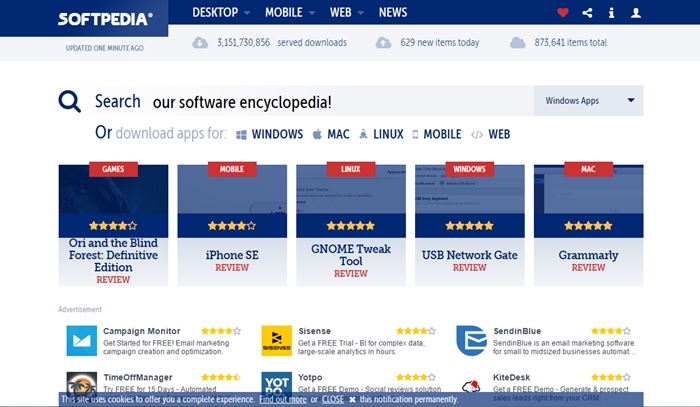
Softpedia is also one of the most popular free software download sites where you have the ability to find any free and paid software that can run on multiple platforms. The best thing about Softpedia is that it provides the latest version of the software you suggest. It also gives you with software reviews and actual screenshots for all used software. Do try it, as this is one of the best website.


3. SnapFiles


Websites for Downloading Windows Software

Yet, SnapFiles ia another one free download site that doesn’t bother about any crapware. It provides you the different categories where you can easily find top 100 free software, top user favorites, top portable apps, software reviews etc. You can easily use different software categories to find your favorite one.


 4. DownloadCrew


Websites for Downloading Windows Software

Download Crew is also one of the website that provides tons of software with their small fonts and stuff on the home page. While downloading, you don’t have to bother about the custom installer crapware and even you can find software for multiple platforms like Windows, Linux, Mac OS X etc.


5. MajorGeeks


Websites for Downloading Windows Software

MajorGreeks is considered as one of the reputed site free software download even if it has outdated web design. It doesn’t bundle the actual software in any custom installers and downloading crapware. The maintenance of the site is under couple of geeks who actually test the software arising questions in them before listing them on their website.


6. FilePuma

Websites for Downloading Windows Software

Update Detector is a free application from FilePuma.com that helps keep the software on your computer up-to-date. And this application make this site the better choice to update the software for free. So must try out this site.


7. DonationCoder

Free Websites for Downloading Windows Software

The Best Freeware, Donationware, Software Reviews, Discussions, and Shareware Discounts. So must try out this site for getting the free of the software in your windows Pc and also the software you get will be genuine.


8. FileHippo


Websites for Downloading Windows Software

This is one of the best site that personally used by me. This site is having collection of all the best and popular software that you usually need in your day to day use. So must give a try to this site.


9. BrotherSoft


Websites for Downloading Windows Software

The biggest software directory for freeware and shareware download at brothersoft.com. Open the site and you will see the interactive interface and there search for any of the software you wish to download.


10. ComputersHopper


Websites for Downloading Windows Software

ComputerShopper.com features reviews about the latest software downloads. So must visit and download the software free in this site.
Tech Touchz is a Network about Hacker News, Tech News &Tech Hacks - Latest &Tech News, Hacker News and Hacking Tricks About Technology

The Best top 10 project management tools for 2016

Project management is one of the high-responsibility tasks in modern organizations. Project management is used in several types of projects ranging from software development to developing the next generation fighter aircrafts.

Best top 10 project management tools for 2016
In order to accomplish a project successfully, the project manager or the project management team should be supported by a set of tools. These tools can be specifically designed tools or regular productivity tools that can be adopted for project management work.

Usually, the use of such tools makes the project managers work easy as well as it regulates the work and the routine of a project manager.

With the introduction of computer technology, there has been a number of software tools specifically developed for project management purpose.

Let’s take a look at each of these projects that are used in active development, hosting options, mobile solution, and much more.

MyCollab


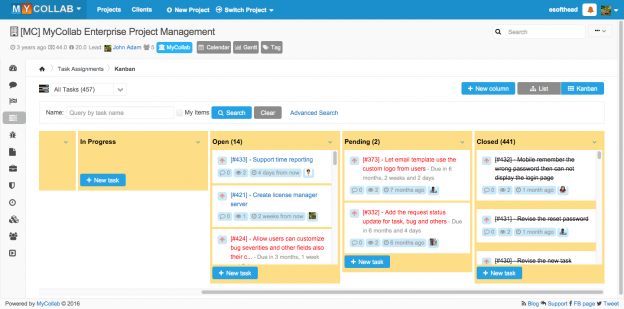
MyCollab is a multi-purpose solution, which features tools for customer relationship management, project management, and document management. In this case, we have a look at MyCollab-Project.

pm16-mycollab.png


MyCollab-Project includes many features, like a Gantt chart and milestones, time tracking, and issue management. It also supports agile development models with its Kanban board. MyCollab-Project is available in three editions, of which the community edition is the free and open source option.

Released on March 14, 2016, the current MyCollab version is 5.2.9. Also, mobile readiness has been significantly enhanced with a previous release, 5.2.6. MyCollab does work well on both desktop and mobile devices.

MyCollab is licensed under AGPLv3, requires a Java runtime and MySQL stack, and the source code is available on GitHub.

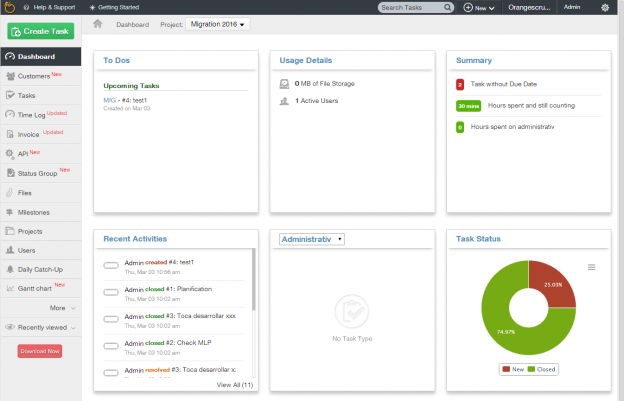
OrangeScrum

OrangeScrum is a project management tool for freelancers, agencies, and small to medium businesses. It includes features such as a scrum task board, Kanban and Gantt chart views, resource planning, and progress tracking.
pm16-orangescrum.png

The new skin of OrangeScrum based on the Google Material Design is noteworthy. Android and iOS mobile applications are expected for version 2.0, in June 2016.

Based on the CakePHP framework, OrangeScrum is licensed under GPLv3. Its latest release 1.5.9. is available for download, and the source code can be found on GitHub.


Taiga


Taiga is an open source project management platform for startups, agile developers, and designers. It concentrates on agile development methods, and has all of the essential features such as a backlog, Kanban board, sprints, tasks, and issues.


pm16-taiga.png
Distinguished features are the integration with GitHub, GitLab, and Bitbucket, making it an interesting project management tool for developers. Taiga can also be extended through plugins, and has a REST API. Taiga integrates video conferencing functions with the use of third party services from Talky.io and Appear.in. Group and private chat is done via HipChat.

Taiga is released under GNU Affero General Public License GPLv3, and requires a stack which includes Nginx, Python and PostgreSQL. The latest release, 1.10.0 Dryas Octopetala, is available on GitHub.


Odoo

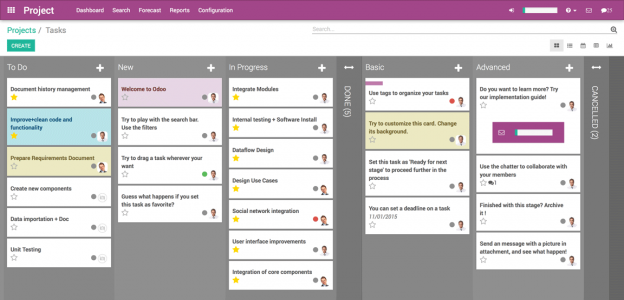
Odoo is a multi-platform solution, supporting Windows, several Linux distributions, and other operating systems as well. Targeting companies of all sizes, the application suite includes billing, accounting, manufacturing, purchasing, warehouse management, and project management.
pm16-odoo.png


While the community edition is free and open source, the features are limited compared to the enterprise version. Odoo project management has some interesting features, such as Gantt charts, graphs, a Kanban view, tasks and issues, and more. Prominent assets are the community resources, and its official Docker image.

Odoo is licensed under GPLv3, and requires Python and PostgreSQL. Its latest release, 9.0, is available for download and as source on GitHub.


Tuleap Open ALM


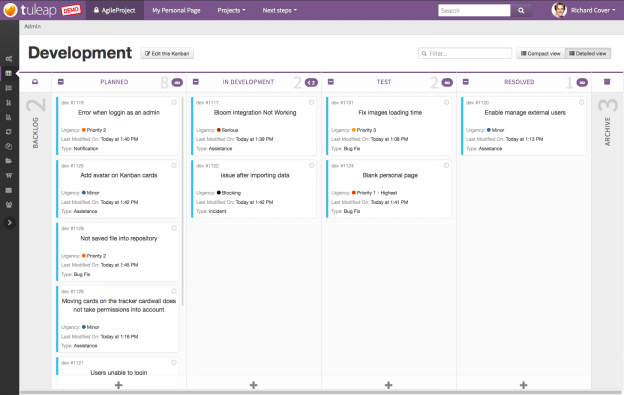
Tuleap is a project management system for managing application lifecycles, Agile development and design projects, V-model, Requirement Management, IT Services Management, and so on. With emphasis on software development projects, Tuleap provides a feature rich platform which includes project management features like Scrum and Kanban support, tracking, document management, and other collaborative tools.

pm16-tuleap.png


Tuleap is a software platform for project management that enables managers and developers to utilize diverse development methodologies including Agile, traditional, or hybrid or custom processes. It supports planning, sprints, tasks, reports and more. Tuleap has a built-in risk management system. It features site-wide trackers and real-time reports on risks, requirements, tasks, bugs, change requests, support requests, user stories.


This tool is very appropriate for open source development companies, as the tool also integrates with Git, SVN, Jenkins, and more. Tuleap also provides an appliance installation (virtual machine), or installation through Ansible.


Tuleap is licensed under GPLv2. Its latest release Tuleap 8.12 can be downloaded from the site.


Agilefant

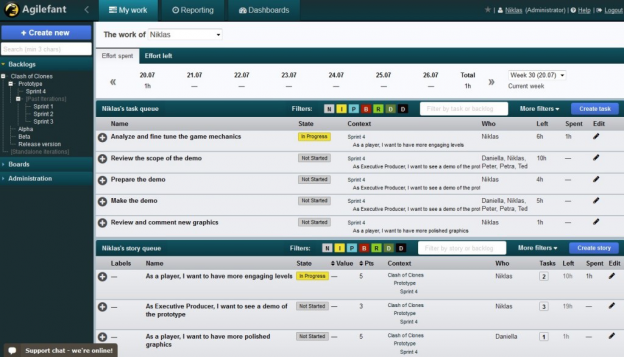
Agilefant is a free and open source, electronic web-based backlog management tool. It concentrates on agile approaches involving Kanban and Scrum, but also can be twisted to support traditional approaches to project management such as the waterfall method.
pm16-agilefant.png


Agilefant is suitable not only for organizations with software development or product, project and iteration management needs, but also for organizations with needs to time tracking and reporting, planning and organizing daily work with other team members.


Agilefant can be downloaded and deployed into your own private cloud. You can also sign up for a free cloud offering called a solo plan.


Agilefant runs on Java, Tomcat, and MySQL. The source code and license can be found on GitHub.


Redmine


Redmine is a free and open source, web-based project management and issue tracking tool. It allows users to manage multiple projects and associated subprojects. It features per project wikis and forums, time tracking, and flexible role based access control. It includes a calendar and Gantt charts to aid visual representation of projects and their deadlines. Redmine integrates with various version control systems and includes a repository browser and diff viewer.
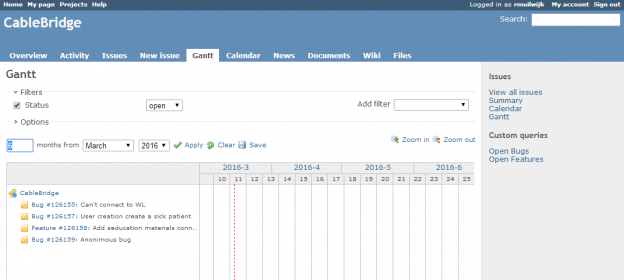

pm16-redmine.png


Redmine also has an advantage in access: it is available to project managers, other team members, as well as, the clients.


Redmine is licensed under GPLv2, and requires Ruby and Rails and a database platform like MySQL, PostgreSQL or SQLite. Its latest release 3.2.1 is available as a download.


Project-open


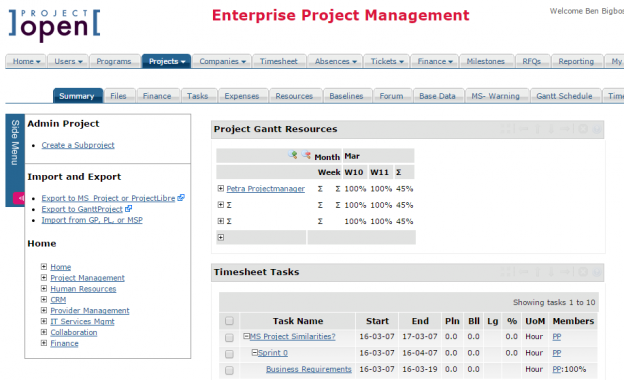
]project-open[ is an enterprise project and portfolio management system and ERP. It includes modules for resource management, timesheet management, HR, CRM, ITSM, collaboration and financials. ]po[ is built on top of OpenACS.org, an open-source Web platform featuring role-base permissions, workflows, dynamically extensible objects and full-text search.

pm16-projectopen.png


The software is released under a mixed source model, or a “dual license,” which means that at its central it is open source (GPL), with additional modules released under a commercial license. Depending on a stack of open source packages,]project-open[ runs as client software on both Windows and Linux.

]po[ is currently working on version 5.0, which includes a Gantt editor, a portfolio Planner and several charts rendered in HTML5.

]po[ is available in many forms, as installers for both Linux and Windows, but also in cloud images, and as virtual appliance.

OpenProject


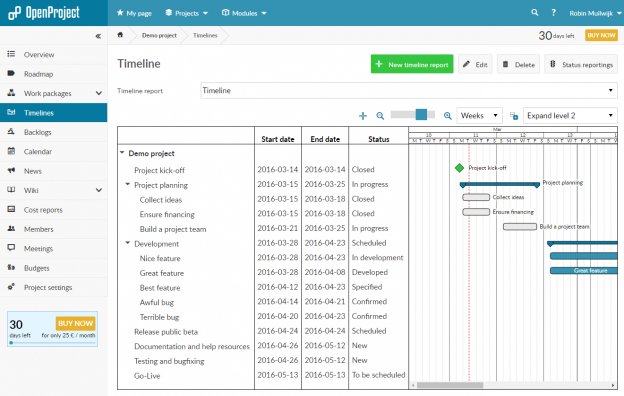
OpenProject is a web-based project management system for location-independent team collaboration. With its feature set, OpenProject is designed to support your project teams throughout the entire project lifecycle and offers collaborative project planning, task management, timeline reports, time and cost reporting, Scrum, and much more. Some features of OpenProject, which makes this tool noticeable, are its user interface, API, extensive documentation, and rich feature set, which makes it a good selection for enterprise needs.

pm16-openproject.png

Currently, OpenProject is working on version 5.1, which will bring aligned work package creation, accessibility enhancements, design and usability improvements, and more.


OpenProject is released under the GNU General Public License Version 3 and is continuously developed by an active open source community. OpenProject is licensed under GPLv3. Its current version 5.0.16 is available for download.


ProjectLibre

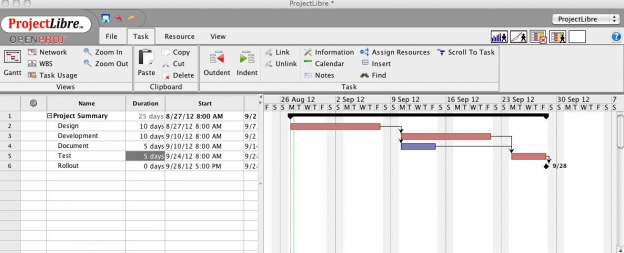
ProjectLibre is an award winning project management tool, which has been downloaded over two million times in 200 countries. It is a project management software system. It intends to be a complete desktop replacement for Microsoft Project. ProjectLibre runs on the Java Platform, allowing it to run on the Linux, Mac OS or MS Windows operating systems. It holds features such as support for task management, resource allocation, tracking, Gantt charts, and much more.
pm16-projectlibre.png

The ProjectLibre team is completely rewriting the code, giving it a new modular architecture, which in turn allows for a stronger engine.


ProjectLibre is licensed under a Common Public Attribution License Version 1.0 and thus qualifies as Free Software, according to the Free Software Foundation. It’s based on Java, and available for download.
Tech Touchz is a Network about Hacker News, Tech News &Tech Hacks - Latest &Tech News, Hacker News and Hacking Tricks About Technology

Remove Virus from Computer without any Antivirus

Remove Virus from Computer without any Antivirus In this method we will discuss some ways, by using them you can make your computer virus free and also your computer will run faster and perform better. So have a look on these methods below.


1. Remove Computer Viruses, Using Command Prompt

Step 1. First, of all click on Start and type cmd. Now right click on a cmd icon and select run as administrator. Now command prompt window will open, now select your drive which you want to remove a virus.


Remove Virus from Computer without any Antivirus

Step 2. Let the drive be D. So now type “dir D: attrib -s -h /s /d *.*” Now type  then press enter.


Remove Virus from Computer without any Antivirus

Note: Capital D is the considered as the drive to be checked you can change the drive 
according to your needs.

Step 3. Now the command prompt will explore your selected drive and will load all the files on your drive.
Remove Virus from Computer without any Antivirus

Step 4. Now if you notice and unusual file.exe and any of autorun.inf then rename it with the command (rename filename.extension new filename)


Remove Virus from Computer without any Antivirus

That’s it now you can access your drives without affecting from viruses.


2. Disabling Suspicious Services In Task Manager

Step 1. First of all open task manager by pressing CTRL+SHIFT+ESCAPE and end all suspicious services under services section.

                                   Remove Virus from Computer without any Antivirus

Step 2. Now from new task start MSConfig.


                                   Remove Virus from Computer without any Antivirus

Step 3. Now in MSConfig box go to the service tab and then uncheck any suspicious or unwanted service that you can guess by thinking that did you have installed something related to that service or not.


Remove Virus from Computer without any Antivirus

Step 4. Now You need to head over the next tab “Startup” Look over any suspicious or unwanted files and under command section, you will find the path of the suspected file


Remove Virus from Computer without any Antivirus

Now open the command prompt and go to that location of the suspect file and change the of the file as discussed in the first method with the help of CMD. And then simply delete the file from there.


3. Using Online Scanner To Scan Your Files

Remove Virus from Computer without any Antivirus
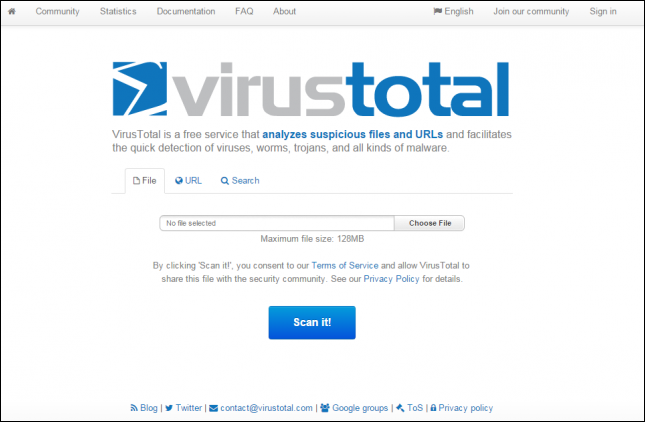
VirusTotal is a free service that analyzes suspicious files and URLs and facilitates the quick detection of viruses, worms, trojans, and all kinds of malware.

Step 1. Go to www.virustotal.com from your favorite browser

Step 2. Now you need to scan the suspected files  on Virustotal. (Max size is 128MB)

Step 3. In Virustotal, you can scan particular URL or even the whole site. For that, you just need to enter your suspected URL under “URL” in virustotal.  After you have selected the files or URL now you have to hit the “Scan it” button.


Thanks for  reading kindly follow these steps on your pc to get a perfect result and don't forget to share others
Tech Touchz is a Network about Hacker News, Tech News &Tech Hacks - Latest &Tech News, Hacker News and Hacking Tricks About Technology


The best alternative to IDM [Internet Download Manager] is now available for you to enjoy your fastest download speed and is free software no need of cracking the software because its open source software
  

EagleGet is a universal download accelerator that supports HTTP, HTTPS, FTP, MMS and RTSP protocols. The application can also download video files from most popular online video websites. Helpfully, the developers have also created an extension for Google Chrome!


EagleGet Downloader The Best Alternative for IDM


Features


  • Accelerate downloads by using multi-threaded technology.
  • Download files in Chrome, IE, Firefox and Opera with one click.
  • Support MMS, HTTP, HTTPS, FTP and RTSP protocols.
  • Download online videos from popular sites.
  • Built-in Media Grabber & Video Sniffer.
  • Built-in download scheduler for multiple queues.
  • Download different file types to separate folders.
  • Batch downloads function with clipboard capture.
  • Automatic refresh expired download address.
  • Support HTTP and SOCKET proxy.
  • Support fully customized User-Agent.
  • Monitor running and completed tasks with TaskMonitor.
  • Supports drag-and-drop to rearrange the priority of downloads.
  • Automatic run virus scan after download.
  • Automatic convert media format after download.
  • Convenient task properties panel.
  • Detailed connection log for each task.
  • Verify integrity of downloaded files.
  • Shutdown, hibernate or sleep computer after completing all transfers.
  • Built-in speed limiter.
  • Flexible notification configurations and Silent Mode (Game Mode) function.
  • Import download lists from other download managers.
  • Customizable user interface.
  • Supports multi-language interface (more than 30 languages).


EagleGet Downloader The Best Alternative for IDM

How to Install?


  1. Download the latest From Here
  2. Make sure you close  your browser before installing setup file
  3. Install setup file until finish
  4. Done and Enjoy!


Note:This software is totally free


Tech Touchz is a Network about Hacker News, Tech News &Tech Hacks - Latest &Tech News, Hacker News and Hacking Tricks About Technology
Very soon you will start seeing profile video on your Facebook friends profile, Facebook promised to implement video profile this year. And now the sign of Profile Videos start displaying when trying to edit profile picture.This new feature is now available in the Android application.


With this new feature you can be able to pass message to all people trying to using your profile.

This new feature is easy to use and operate. kindly update your Facebook app from play store to enjoy this feature while iOS users should update their app from Apple store to enable it.


Note: The video should not be more than 30 seconds long