Articles by "Security News"
Showing posts with label Security News. Show all posts
Tech Touchz is a Network about Hacker News, Tech News &Tech Hacks - Latest &Tech News, Hacker News and Hacking Tricks About Technology

Here is the look at the best hosting solution that suits your business

Best Hosting Solution for your business

Web hosting comes in many standard and customized packages with different combinations of bandwidth, price, features and ad-ons. It can be very challenging for even a pro to choose the right solution. Therefore, the best way to select a suitable hosting package is by understanding the exact server requirement of your business and website.

The second most important thing you need is to set aside the maximum budget possible for these services. This would simplify the process of choosing the right kind of web hosting solution for your business.

If you do not exactly understand what all services you get in a web hosting solution? The answer is very simple! A web hosting service mainly allows you to make your website accessible via the World Wide Web. In order to do so, you get limited/unlimited disk space, along with some free Email accounts, Web site builders and marketing tools, and sometimes podcast and blogging tools. Usually the basic packages are offered for 1 year duration, which you need to renew each year.

Types of hosting servers


There are 4 types of servers that include Shared, Dedicated, Cloud and VPS.


Shared web hosting


It is the best suggestive measures who are running short of budget as you are not paying the cost solely. You are sharing it with other owners. Here you share the different software applications and physical server provided by web hosting services with others. The biggest drawback faced by the user is the slowest speed as huge numbers (above 1 thousand) of users are put to single server. Almost 3,000 sites use it. It may happen that a part of the users are utilizing maximum space of the server by having huge visitors and the remaining users are left with too little and such bad neighbors actually declares the idea of shared hosting as a bad one. Get your server shifted if you are facing any such issues. If you are having a test site or website without expecting uptime then this kind of hosting could be used. People with low budget find it too useful as in their tight budget they are in a position to prove their presence to the world.


Dedicated hosting


It is recommended for those sites that are expecting to have one million or more visitors in a month. You can avoid all bad neighbors as you are using it alone. The performance speed is extremely high in this hosting but yes it comes with huge cost that you need to pay on your own. You may select the kind of memory you want, OS, hardware elements and other customization as per your requirement through it. You get the feature of flexibility here. It is advisable for those who possess great knowledge about server technology as they need to handle everything on their own.

One of the most popular dedicated hosted server is Gmod server, offered by many hosts like gmod.eu, elpishost.com, elpishost.com and more. In order to find the best gmod server, it is always recommended to do some in-depth research on Google or Yahoo!, read reviews of their old clients before spending your money.


Cloud hosting


It permits you to use the multiple servers’ resources in single network and turns it highly scalable. It is very secured hosting service. It acts like a protection guard against DDOS attack. It has become the choice of mass and users are shifting from VPS to cloud hosting services for better service.

VPS


Virtual Private Sector is one of the upgraded web hosting services which is shared differently. It is restricted to be shared among 10-20 users and is highly flexible. It is scalable and configurable. It is more cheaper and strong server.

Selecting the right web hosting service is a tough go but you are just required to choose the best option for you. There are several companies that are offering you with these services; you are just required to have an inner look into it to understand what suits you most!
Tech Touchz is a Network about Hacker News, Tech News &Tech Hacks - Latest &Tech News, Hacker News and Hacking Tricks About Technology

It’s Payback Time: Angry employee shut down 90% of Citibank servers

 shutting down banks server
Citibank Sysadmin gets 21 months in prison for intentionally shutting down banks server

“Often, the right path is the one that may be the hardest for you to follow. But the hard path is also the one that will make you grow as a human being” – Karen Mueller Coombs

As an employee at any job, you can’t help but feel sometimes that you are a victim of the unresolved issues of one boss or another – bullies. This leads to a lot of resentment in the employees, which in turn makes them take drastic steps knowingly or unknowingly.

Such, is the case of a Dallas man who worked at Citibank Regents Campus in Irving, Texas, in 2012 and 2013. On Monday, a Texas judge sentenced Lennon Ray Brown, 38, to 21 months in federal prison for intentionally deleting the configuration of nine out of ten Citibank routers, causing the bank’s entire network to go down for hours in December 2013. He has also been ordered to pay $77,200 in restitution.

Brown, who worked for Citibank first as a contract employee in Texas’s branch and then started working as a full-time employee from February 2013 pleaded guilty to an indictment charging one count of intentional damage to a protected computer in February 2016. Brown’s responsibilities in his job as a computer engineer were to manage the bank’s IT network.

According to court papers, on December 23, 2013, he was called upon by his supervisor earlier in the day and lectured by one of his bosses for his poor work performance. Later during the same day, authorities say that Brown waited for working hours to finish. At approximately 6:03 p.m. that evening, Brown knowingly transmitted a code and command to 10 core Citibank Global Control Center routers, and by transmitting that code, wiped out the running configuration files in nine of the routers. However, his intention was to wipe out all of the bank’s ten central routers, but the code executed only on nine of the servers. Approximately 90% of all Citibank networks across North America were affected due to the loss of connectivity. At 6:05 p.m. that evening, Brown swiped his ID card through the gate to exit the Citibank Regents Campus and went home.


The Court referred to Brown’s behaviour as “criminal vandalism” in the sentencing hearing this Monday. The authorities also read a text that Brown sent to a co-worker immediately after he shut down Citibank’s system, “They was firing me. I just beat them to it. Nothing personal, the upper management need to see what they guys on the floor is capable of doing when they keep getting mistreated. I took one for the team. Sorry if I made my peers look bad, but sometimes it take something like what I did to wake the upper management up.”
Tech Touchz is a Network about Hacker News, Tech News &Tech Hacks - Latest &Tech News, Hacker News and Hacking Tricks About Technology

Sadly! Pokémon Go Servers Went Offline After A Massive DDoS Attack

Servers Goes Offline After A Massive DDoS Attack


Pokémon Go Players who are looking to spend their weekend playing the game were left disappointed. On 16th July a significant interruption striked the game servers. However, PoodleCorp claims this time about the interruption and had mentioned that they had used a DDos attack to take down Niantic servers.

In a DDoS attack, the incoming traffic flooding the victim begins from many unusual sources – potentially hundreds of thousands or further. This completely makes it difficult to stop the attack simply by blocking a single IP address. Moreover, it is very difficult to recognize genuine user traffic from attack traffic when spread across so many points of entrance.

According to the sources, this attack took place just after the Game Pokemon Go launched in 26 more countries in Europe which include Ireland, Greece, Poland and Sweden.


“Our servers are humbled by your incredible response. We are working to resolve the issue. Please try again soon!” It was the message that was shown to Pokémon Go users when they tried to play the game.


Servers Goes Offline After A Massive DDoS Attack

Pokemon Go’s soon recognized the attack and then tweeted from its official twitter account “Trainers! We have been working to fix the #PokemonGO server issues. Thank you for your patience. We’ll post an update soon.”

Trainers! We have been working to fix the #PokemonGO server issues. Thank you for your patience. We'll post an update soon.

— Pokémon GO (@PokemonGoApp) July 16, 2016

As we already mentioned that the hacker group Poodle Corp claims the responsibility of all the happenings. Poodle Corp tweeted about the responsibility for the latest interruption “PokemonGo #Offline #PoodleCorp”

PokemonGo #Offline #PoodleCorp

— PoodleCorp (@PoodleCorp) July 16, 2016

Poodle Corp twitter account also retweeted one of the posts of a user whose name was “XO” that reads “Just was a lil test, we will do something on a larger scale soon.”

Just was a lil test, we will do something on a larger scale soon .

— XO (@xotehpoodle) July 16, 2016

As soon as Pokémon Go servers went down fans preferred social media to voice their rage and disappointment. Some of them also came out with some funny tweets.

When pokemon go goes down and you don't know how to cope pic.twitter.com/UuuvZddL8i

— TechnicallyRon (@TechnicallyRon) July 16, 2016

I'm really pissed off that Pokémon Go is down because a group of killjoys decided it would be fun to hack the servers and take them offline.

— Meg Bethany Read (@triforcemeg) July 16, 2016

Why would someone hack the #PokemonGO servers and make the game go down? I don't get it and I really want to catch them all! #😫 #whyyy

— Rachel A (@RachelAnders66) July 16, 2016

Servers down. Guess I will chase the real thing. #PokemonGO pic.twitter.com/3DIbI2jOZN

— Me, Myself and I (@HolmesRia) July 16, 2016


For your information let me tell you PoodleCorp was the same group who hacked some popular Youtube Accounts which includes the accounts of WatchMojo, Lilly Singh, Redmercy, and Leafyishere. This time, they have taken down one of the world’s most famous game Pokemon Go servers.
Tech Touchz is a Network about Hacker News, Tech News &Tech Hacks - Latest &Tech News, Hacker News and Hacking Tricks About Technology

Here Is The Most Secure Antivirus 2016 For Window 10 

Most Secure Antivirus 2016 For Window 10

Most Secure Antivirus 2016 For Window 10 

ESET Smart Security is a secure antivirus your pc need to clear and terminate all your pc virus.
This Antivirus is the most secured antivirus that work effectively with window 10 and window 8 effectively 
It's keep your pc from dangerous virus, hackers, malware, infected website and other pc threat.

Here are the antivirus features that check it below:
Most Secure Antivirus 2016 For Window 10

Most Secure Antivirus 2016 For Window 10 

Key Benefits

  • Advanced Antivirus Protection

Scan into multiple layers of compressed files to ferret out malicious software. Customizable settings for the search depth, file size, archive size and timeout of scans give your IT admin precise control.

  • First-class Customer Care

You can always rely on the professionalism of ESET Technical Support representatives to assist you when integrating and managing our security products.

  • Performance Metrics

Get easy-to-understand statistics and graphs that show performance of the antivirus, anti-spyware, and real-time protection modules.

And Many More.....

Key Features

  • Unified Management

Manage all the computers on your network, whether they are Mac, Linux or PC with ESET Remote Administrator — a huge time-saver for multi-platform networks with antivirus compliance requirements.

  • Advanced Remote Installation

Administrators can define exactly which users have permissions to modify ESET Smart Security /NOD32 Antivirus settings and be confident that unauthorized users will not disable or degrade the level of security on your Mac.

  • Removable Media Scanning

Check removable media devices for malware with on-access and on-demand scans before you mount them to your Mac.

And Many More.....


System Requirements

-Processor Architecture: 32-bit (x86) / 64-bit (x64), Intel®

-Operating Systems: Window 8,10 other Os


How To Download And Install

  • For Developer

ESET Smart Security 9 Antivirus Download Here

  • For Ordinary User

ESET NOD32 Antivirus 9 Download Here

For Other ESET Products click  Here

After Installation Download the Full Version Serial Download Here

This Antivirus is tested and trusted, for any error or issue kindly leave comment for solution or discussion...


Tech Touchz is a Network about Hacker News, Tech News &Tech Hacks - Latest &Tech News, Hacker News and Hacking Tricks About Technology


wi-pay


 Ighedo Charles is the vice president, Information Technology Operations at Wi-Pay Technologies Limited, an e-payment solutions company.


He says the company is providing a platform for Nigerians to make transactions in the comfort of their homes. He spoke with Ikechi Nzeako.


What does Wi-Pay Technologies do?


Wi-Pay Technologies is an e-payment solutions company and we are licensed by the Central Bank of Nigeria as payment terminal service provider to major banks in the country and we provide a payment platform.


How do people get on your platform; how do your clients use your platform?

We provide support for PoS for merchants in different locations. So for merchants who require PoS in different locations, retail or small businesses, we work in conjunction with the banks to provide PoS for such merchants. For our mobile apps, people who want to do e-payment, local money transfer, buy airtime, pay bills, they can go to the Wi-Pay website and download our app.


Do users of your service have to pay high fees to access it?

  • No, it is free to download our app.
  • How old is the company in the county?
  • Wi-Pay is four years old in the country.


How has the experience been?

The experience in the country has been both exciting and rewarding.  How has the competition with other companies that provide similar services been?

It is a very competitive space and we take the example laid down by companies that have been operating before us and we rise in situations where they have fallen or not met the expectation of the clients.

We try and satisfy customers where they feel they have not been fully satisfied with the services of the company they previously engaged with.

How will you assess the business environment in the country?

Nigeria is a growing market and payment in the country is such that if you find a need, people will be willing to pay for their need if you meet them at the point of their need. So I believe to a great extent that, may be, the country still has about 67million people who are unbanked.

The unbanked parts of the population are people, who have needs that the e-payment companies have not been able to meet yet. I believe that if we find a way to meet this huge number of people at the point of their need, we will have these people on board using e-payment platform.

There is the issue of low Internet penetration in the country and as an e-payment company; you rely on the Internet to a large extent in your operations. How do you overcome this challenge?

We are very grateful to the GSM (global satellite communications) companies in the country for their equipment and facilities spread across the country. With the availability of data on mobile phones, tablets, computers and other devices, this has provided a great opportunity for us to reach a great number of people in the country ordinarily we will not have access to through the internet. If it were back in the day you had to deploy a V-sat or go to the cyber café to access the internet, it would have been a tougher terrain to navigate. But right now, with the proliferation of mobile networks, it is easier to reach the man in the remotest village in the country the same way it is easy to reach the man in the city.


What type of devices can people use to access your platform?

Presently on mobile devices, for example, you can download our mobile app using an android mobile phone; very soon we will have the Apple’s iOS version of our application ready. You can also access our platform using your normal web browser. As I said before, if you want to pay your bills, just go to the Wi-Pay website.

The power situation in the country is poor and companies in the country are reeling under the impact, how are you overcoming the challenge?

With the poor power situation in the country, part of the things we are leveraging on is keeping our servers in the cloud mostly such that we do not have physical deployment on the ground. We are not impacted by the unavailability of diesel to power our servers to a great extent. I believe that our equipment is battery-powered. This has to a large extent helped to enhance our operations and viability of the company.

In how many cities in the country are you currently operating?


We are currently operating in two cities, which are Lagos and Port Harcourt

What specific policies and programmes do you think government can put in place to make the business environment friendlier for businesses like yours?


Policies to put in place to make the environment less challenging, service providers like us should be allowed to charge more on transactions, may be that could help; there should be policies that commit merchants to using some of the e-payment solutions that are available in the country that will also help to reduce the cost of running business.

What are the challenges that your company has faced in the course of doing the business and have overcome them?

The major challenge here is adoption, adoption in terms of convincing people to migrate from the normal way of doing transactions to the e-payment way of doing transactions. We have been encouraging Nigerians to migrate to the e-payment way of doing business. We have been sharing with them the cost of doing business the normal way relative to doing transactions using the e-payment way.


Take for example payment for DStv subscription, you enter a bus, spend about 30 minutes to their office to make the payment and, probably you want to pay about N3,600. You may spend more than N600 to and fro on transport but if you make use of our e-payment platform, you will only pay N100 convenience fee from the comfort of your home while you are resting. We are encouraging customers to understand that using the e-payment platform is a lot cheaper and convenient than going physically to the bank to make payments.


Where will Wi-Pay be in the next five years?

In the next five years I want to see the company in all parts of the country, especially in rural communities where majority of the unbanked part of the population reside. Our mission is to reach people who are not financially included; we want to reach people in the most remote part of Nigeria and as said at the beginning of the interview, we want to provide them with services that ordinarily meet them at the point of their need, as opposed to dumping technology, which they do not understand, on them.
Tech Touchz is a Network about Hacker News, Tech News &Tech Hacks - Latest &Tech News, Hacker News and Hacking Tricks About Technology

Based on Linux, Android is compared to iOS Mobile and Windows 10. Microsoft and Apple each of operating systems, which is based on open source. Exactly, for this reason, users of Android can easily ‘root’ their devices, get privileges as an administrator on the operating system and thus control even how the software controls power to the processor, RAM or GPU.

Beware Android users, “GODLESS” Malware affected 90% of Android devices

However, rooting Android is also exploited by hackers and recently discovered a malware that is used against the user which usually targets devices running Android Lollipop or earlier. Recently Trend Micro security labs find out a family of mobile Malware which is known as “Godless” detected as (ANDROIDOS_GODLESS.HRX)

According to Trend micro labs, almost 90% of Android devices run on affected versions, malicious apps related to this threat can be found in prominent app stores, including Google Play, and has affected over 850,000 devices worldwide.


According to Trend Micro Labs, Godless uses a framework called “android-rooting-tools” to gain the root access to Android-based devices “Godless is reminiscent of an exploit kit, in that it uses an open-source rooting framework called android-rooting-tools. The said framework has various exploits in its arsenal that can be used to root various Android-based devices. The two most prominent vulnerabilities targeted by this kit are CVE-2015-3636 (used by the PingPongRoot exploit) and CVE-2014-3153 (used by the Towelroot exploit). The remaining exploits are deprecated and relatively unknown even in the security community.”

Apart from this, Godless malware can receive remote instructions that let apps to automatically download and silently install on Android devices which in results users are affected with unwanted spam apps that contain ads. This can even use to install backdoors and spy on the users.

Trend Micro recommends downloading apps from trusted stores such as Google Play and Amazon. Users must have secure mobile security that can mitigate mobile malware
Tech Touchz is a Network about Hacker News, Tech News &Tech Hacks - Latest &Tech News, Hacker News and Hacking Tricks About Technology


Here Are The 10 Best Penetration Testing Linux Distributions 2016 For Ethical Hackers.

Penetration means to penetrate any security system and this is mainly used to check the vulnerability of the bug in the network security. And mainly these testing is done with some pro security tools. But today there are many tools that have been developed which can be used as the pen-testing tool. These tools will be really helpful and can be used by a limited knowledge about security and its vulnerability.


1. BackTrack 5r3

Linux Pentesting Distro 1

BackTrack is one of the best known Linux pentesting distros. It gives you a “The quieter you become, the more you are able to hear.” BackTrack is usually based on the ever-popular Ubuntu. It is used to be only available within a KDE environment but to the added version Gnome was added with BackTrack v5. Its too popular pentesting distros that can run on any live CD or flash drive. The distribution is absolute for wireless cracking, exploiting, web application assessment, learning.


2. BackBox Linux

Linux Pentesting Distro 2


Now-a-days, Backbox is getting more popular. Similar to BackTrack, BackBox Linux is an Ubuntu-based distribution designed basically to perform penetration tests and security assessments. It was designed by developers with an idea to create a penetration test as fast and easy to use. It includes a very pretty short looking desktop environment and is updated to the latest versions of most used and best known tools through repositories.
BackBox provides all suspects for Forensic Analysis,Documentation and Reporting and Reverse Engineering with john, nmap, Social Engineering Tool etc.


3. Blackbuntu


Linux Pentesting Distro 3

The name clearly defines that it is yet another distro that is based on Ubuntu. It comes wit many pentesting distros as Information Gathering, Network Mapping, Vulnerability Identification, Penetration, Maintaining Access, radio Network Analysis, Reverse Engineering. The list is heavy too but the tools defined are different to the other distros.


4. Samurai Web Testing Framework

Linux Pentesting Distro 4


This is one of a live distro that is pre-configured with some open-source tools that aims only on testing and attacking websites. The main purpose of Samurai Web Testing Framework is it is based on attacking websites. The four steps are outlined by developers to carry out a web pen-test. These steps are incorporated within the distro and includes tools to complete up the task:


  1. Reconnaissance – Tools include Fierce domain scanner and Maltego.
  2. Mapping – Tools include WebScarab and ratproxy.
  3. Discovery – Tools include w3af and burp.
  4. Exploitation – Tools include BeEF, AJAXShell and much more.


5. Knoppix STD

Linux Pentesting Distro 5

Knoppix STD is based on Debian and was originated in Germany. The architecture of Knoppix StD is i486 and it runs on platforms like GNOME, KDE, LXDE. It was introduced from the long time. Basically, It was designed to be used as a live CD and can be installed on a hard disk. The STD stands for Security Tools Distribution. Knoppix provides you full scenario for cryptography.


6. Pentoo

Linux Pentesting Distro 6

Pentoo is based totally on security live CD on Gentoo. “Pentoo is Gentoo with the pentoo overlay“. The best distro to use is Pentoo. The homepage lists some of their customized tools and Kernel that includes a Hardened Kernel with aufs patches, Back ported Wifi Stack and even Cuda/OPENCL cracking support with all the development tools.


7. WEAKERTH4N


This distro is built from Debian Squeeze and uses Fluxbox for its desktop environment. This penetrating distro is adjusted for Wifi hacking as it contains many wireless tools. Categories of WEAKERTH4N are SQL Hacking, Cisco Expoitation, Password Cracking, Web Hacking,Networking ans Shells.


8. Kali Linux


Kali Linux is an Advanced Penetration Testing Linux distribution used for Penetration Testing, Ethical Hacking and network security assessments. This is one the best pentesting distros that you will surely love to use. Must try this out as this is the tool packed with lots of hacking tools.


9. Bugtraq


Bugtraq is one another reader penetration distro. This distro offers you a widerange of penetration and forensic tools. Bugtraq is harder to install but runs as a live DVD or from a USB Drive. It claims to be updated for kernel’s better performance and is configured too but importantly it can recognize more hardware. The team of Bugtraq seems to be solid as they have put full effort to get the kernel work best with more hardware.


10. NodeZero


Similar to BackTrack, NodeZero is also an Ubuntu based distro for pentesting using repositories. Following the way, Ubuntu releases a patch for its bugs, notifications for the system updates or upgrades are always present. It has become famous due to its inclusion of THC IPV6 Attack toolkit that includes tools like alive6, dnsdict6 etc.

Tech Touchz is a Network about Hacker News, Tech News &Tech Hacks - Latest &Tech News, Hacker News and Hacking Tricks About Technology

Remove Virus from Computer without any Antivirus

Remove Virus from Computer without any Antivirus In this method we will discuss some ways, by using them you can make your computer virus free and also your computer will run faster and perform better. So have a look on these methods below.


1. Remove Computer Viruses, Using Command Prompt

Step 1. First, of all click on Start and type cmd. Now right click on a cmd icon and select run as administrator. Now command prompt window will open, now select your drive which you want to remove a virus.


Remove Virus from Computer without any Antivirus

Step 2. Let the drive be D. So now type “dir D: attrib -s -h /s /d *.*” Now type  then press enter.


Remove Virus from Computer without any Antivirus

Note: Capital D is the considered as the drive to be checked you can change the drive 
according to your needs.

Step 3. Now the command prompt will explore your selected drive and will load all the files on your drive.
Remove Virus from Computer without any Antivirus

Step 4. Now if you notice and unusual file.exe and any of autorun.inf then rename it with the command (rename filename.extension new filename)


Remove Virus from Computer without any Antivirus

That’s it now you can access your drives without affecting from viruses.


2. Disabling Suspicious Services In Task Manager

Step 1. First of all open task manager by pressing CTRL+SHIFT+ESCAPE and end all suspicious services under services section.

                                   Remove Virus from Computer without any Antivirus

Step 2. Now from new task start MSConfig.


                                   Remove Virus from Computer without any Antivirus

Step 3. Now in MSConfig box go to the service tab and then uncheck any suspicious or unwanted service that you can guess by thinking that did you have installed something related to that service or not.


Remove Virus from Computer without any Antivirus

Step 4. Now You need to head over the next tab “Startup” Look over any suspicious or unwanted files and under command section, you will find the path of the suspected file


Remove Virus from Computer without any Antivirus

Now open the command prompt and go to that location of the suspect file and change the of the file as discussed in the first method with the help of CMD. And then simply delete the file from there.


3. Using Online Scanner To Scan Your Files

Remove Virus from Computer without any Antivirus
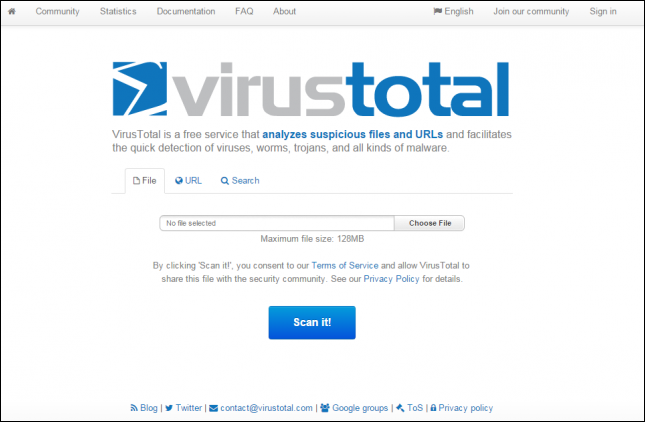
VirusTotal is a free service that analyzes suspicious files and URLs and facilitates the quick detection of viruses, worms, trojans, and all kinds of malware.

Step 1. Go to www.virustotal.com from your favorite browser

Step 2. Now you need to scan the suspected files  on Virustotal. (Max size is 128MB)

Step 3. In Virustotal, you can scan particular URL or even the whole site. For that, you just need to enter your suspected URL under “URL” in virustotal.  After you have selected the files or URL now you have to hit the “Scan it” button.


Thanks for  reading kindly follow these steps on your pc to get a perfect result and don't forget to share others
Tech Touchz is a Network about Hacker News, Tech News &Tech Hacks - Latest &Tech News, Hacker News and Hacking Tricks About Technology

Best Antivirus Programs For Windows 10 Home and Windows 10 Enterprise

Security is paramount and these programs will definitely do their best For Your Pc


Despite the improvements in Windows 10 Home and Windows 10 Enterprise, the operating system is going to become a target for several malware and other attacks. Here are the best antivirus programs to protect your Windows 10 Home and Windows 10 Enterprise operating systems.


After a series of several tests, there’s currently one antivirus program that reigns supreme over others and that is Bitdefender. If you want to see a thorough breakdown of the scores, then read on below.


Best antivirus program for Windows 10 Enterprise


In several tests conducted, Bitdefender got six points in all three tests for protection, performance, and usability, and these 18 points managed to beat other advanced security solutions developed by Kaspersky and Symantec. Kaspersky ranked second with a total of 17.5 points, followed by Symantec with the same number of points. AVG happened to secure fourth place with 16.5 points. If these antivirus programs are a bit steep for your budget, then you can always resort to using Windows Defender, which scored a total of 14 points in the test.

Best Antivirus Programs For Windows 10 Home and Windows 10 Enterprise Best Antivirus Programs For Windows 10 Home and Windows 10 Enterprise

Best free antivirus programs for Windows 10 Home


Out of the several tests conducted, Avast Free Antivirus 2016 got 6 out of 6 points for protection and usability but obtained only 4.5 points for performance. AVG Internet Security received 5.5 points for protection, 5 points of performance, and 6 for usability.

Windows Defender, which comes with the Windows 10 OS suite, is often considered the baseline of antivirus tests, but this time, it received 3 points for protection, 5 points for performance, and 5.5 points for usability. This leads to a total score of 13.5 points out of a maximum of 18, which is not a bad result by any means.

Best Antivirus Programs For Windows 10 Home and Windows 10 Enterprise   Best Antivirus Programs For Windows 10 Home and Windows 10 Enterprise Best Antivirus Programs For Windows 10 Home and Windows 10 Enterprise


While these are free antivirus programs, there are more than a few perks that you will get should you invest in a paid version of that antivirus program.

Softpedia
Tech Touchz is a Network about Hacker News, Tech News &Tech Hacks - Latest &Tech News, Hacker News and Hacking Tricks About Technology
It's the season for iPhone 7 leaks and the forecast is for minimal changes - the phone will be the same size, but the antenna setup has been redesigned.

You can see the new design in this leaked photo. There's just the one camera - the two-camera setup is reserved for the Plus models. This is the Gold color option, by the way, I know the colors of the photo are off, but it is.

Apple iPhone 7 in Gold (leaked photos)


Then there's this alleged photo of the retail box. It's particularly blurry, but you can still make out the text - "iPhone 7 Rose Gold 64GB."

Alleged photo of the iPhone 7 retail box (64GB Rose Gold model)
I guess it's good news that it's not 16GB, leaving a sliver of hope that Apple will finally upgrade the base storage on its phones. Fingers crossed.
Tech Touchz is a Network about Hacker News, Tech News &Tech Hacks - Latest &Tech News, Hacker News and Hacking Tricks About Technology

Free Facebook

The net neutrality ebate aside, Airtel Africa, has launched Free Basics in Nigeria in partnership with Facebook to allow anyone in Nigeria with an Airtel mobile connection to access Free Basics services freely.

Such services include health, education, jobs, and finance. Airtel Africa will also be offering Facebook Flex in Nigeria, which allows people to access a version of Facebook without data charges.

According to Segun Ogunsanya, Managing Director and Chief Executive Officer of Airtel Nigeria: “Today marks a significant milestone in our nation’s drive towards deepening digital connectivity and enhancing mobile broadband access for millions of Nigerians in line with the key objective of Nigeria’s National Broadband Plan (NBBP). It is our belief that this partnership, the first of its kind in Nigeria, will create a plethora of opportunities for millions of Nigerians, empowering them to connect to their dreams, realize their full potentials, and succeed in their professional and personal endeavors.”

Airtel Africa has worked with Facebook since 2014 in enhancing accessibility to the internet in an affordable manner through the launch of Free Basics in Zambia, Kenya, Malawi, Ghana, Seychelles and Rwanda. With the launch of Free Basics in Nigeria, millions more people will have the ability to access basic services.

At the launch in Nigeria, Free Basics has more than 85 services included and it aims to sign up more basic services to people in Nigeria.
Tech Touchz is a Network about Hacker News, Tech News &Tech Hacks - Latest &Tech News, Hacker News and Hacking Tricks About Technology

Learn How to Install Any Version of Windows on Your PC/Laptop from USB

Installing Windows with Usb

CDs and DVDs, which are considered as the standard storage type for installing Windows on personal computers, are now things of the past. Today, we have USB flash drives that are not only small, portable but most importantly they are fast.

In a worst case scenario, where you have to reinstall the operating system on your computer or help out a friend, it is sensible to create an emergency bootable USB drive irrespective of the Windows version you are using, whether it’s 10, 8.1, 8, 7 or older.

Since Windows has native support for making bootable USB drives, we have third-party software solutions that promise to make the job a lot easier for non-tech savvy geeks. Let’s have a look at the three popular utilities, WiNToBootic, Rufus and WinSetupFromUSB.


How to get started

First and foremost, prepare a USB flash drive with a storage capacity huge enough to fit the bootable files of Windows. It is recommended to have USB 3.0, as this version is faster than older versions. To maximize performance, plug it into the blue USB 3.0 connector of your computer unit. While USB 2.0 also works, it is slow.

In the subsequent step, create backups of the USB drive contents (if any) to prepare for clean-up. Since the clean-up is done by the programs automatically, it is not necessary to format the device yourself.

Then, keep an ISO file ready with the operating system. In order to learn how to make an ISO image from a Windows installation disc, click here.

WiNToBootic

Of the three options, WiNToBootic has the lightest set of choices. You can click the menu below the image with the USB drive in the main window to choose the device if you have more than one attached to the PC, as well as click the image to open the drive’s location in Windows Explorer to ensure that it is the correct one.

Later, click the image with the green arrow to detect and select the Windows ISO image, or just drop the file onto this area from Explorer. If this is supported by the OS version and if you plan to run the OS directly from the USB flash drive instead of using a regular setup kit to perform installations, then you can tick the Make Windows To Go box. Moreover, instead of running a normal format, you can check the Quick Format box.

To start the operation, click Do it! and Ok in the two subsequent dialog prompts to approve the action.

Rufus

The interface of Rufus has only one window that shows all settings available. If there are multiple drives plugged into the computer, click on the menu below device to select a USB. Set MBR partition scheme for BIOS or UEFI-CSM at partition scheme and target system type, as this is the safest choice out of the three, File system to NTFS and Cluster size to 4096 bytes (Default).

Click inside the box below New volume label, the Create a bootable disk using menu to select ISO image, along with the CD image next to it to identify the source by tracking and showing the Windows ISO image. At this stage, two new options show up. If you want to run it directly from the USB drive, you can choose Windows To Go or Standard Windows installation if you want to install the OS.

You can leave the remaining options as they are: Quick format and Create extended label and icon files are checked. If you have already failed after trying to create a bootable USB drive, you can ask Rufus to check and fix errors by ticking Check device for bad blocks and by clicking to choose the number of passes, ranging from 1 (quick but less efficient) to 4 (slow but more efficient).

You need to click on Start to begin the operation and Ok in the prompt message to confirm it.

WinSetupFromUSB
Casual users can get a little confused due to the numerous expert settings in WinSetupFromUSB. However, you can click on the menu below USB disk selection and format tools if you want to just create a drive from an ISO image and pick the drive letter if there are multiple devices plugged into the machine, as well as check the Auto format it with FBinst box. The default configuration should be left at FAT32.

Check the second box with Windows Vista / 7 / 8 / 10 / Server 2008 / 2013 based ISO in the Add to USB disk section, and click the button with the suspension marks to locate and choose your ISO image with the Windows installation files.

To start the process, click Go and Ok in the following two dialogs for confirmation.
You can download WiNToBootic, Rufus
Tech Touchz is a Network about Hacker News, Tech News &Tech Hacks - Latest &Tech News, Hacker News and Hacking Tricks About Technology

MTN Has Finally Release Cheapest Data Plans  

The Good News From Mtn Data Plans,Mtn As finally release affordable data for all device after they finish there system upgrading, you don't have to spend much money on expensive data on other network. 
No need to buy any MTN data from third party resellers for now because MTN provides cheapest data for you which you can buy it directly from you sim card.


Below are the Newly MTN data plan bundle for Monthly, Weekly and Daily users.
For Daily plan users
Dial *131*1*1# then you reply any plan you wish to buy

SMS METHOD
MTN 30MB For 100 (Valid for 24Hrs) SMS 104 to 131
MTN 100MB For N200 (Valid for 24Hrs) SMS 113 to 131

For Weekly plan users
Dial *131*1*2# then you reply any plan you wish to buy


SMS METHOD
MTN 750MB For N500 (Valid for 7 Days) SMS 103 to I31

For Monthly plan users
Dial *131*1*3# then you reply any plan you wish to buy

SMS METHOD
MTN 1.5GB for N1000 (Valid for 30 Days) SMS 106 to 131
MTN 3.5GB for N2,000 (Valid for 30 Days) SMS 110 to 131
MTN 10GB for N5,000 (Valid for 30 Days) SMS 116 to 131
MTN 22GB for N10,000 (Valid for 30 days) SMS 117 to 131

Data Plan For All Mifi Users (3Months)
Dial *131*1*4# then you reply any plan you wish to buy

SMS METHOD
MTN 50GB For N20,000 (Valid for 3Months) SMS 118 to 131
MTN 85GB For N50,000 (Valid for 3Months) SMS 133 to 131


Tech Touchz is a Network about Hacker News, Tech News &Tech Hacks - Latest &Tech News, Hacker News and Hacking Tricks About Technology

White Hat, Black Hat, and Grey Hat Hackers : Finding which hacker is what made easy

What Are White Hat, Grey Hat, and Black Hat Hackers?

The long-fought battle between Apple and the FBI over unlocking of San Bernardino’s terrorist iPhone 5C finally saw a resolution. The Washington Post reported this week that the FBI broke into the San Bernardino shooter’s iPhone using the services of paid professional hackers, called as “grey hat” hackers.

The federal government paid hackers a one-time fee to find a “previously unknown software flaw” or a zero-day flaw in the iOS 9 software in the San Bernardino iPhone 5C that would allow them to access the data on the terrorist’s phone.

The new information was then used to create a piece of hardware that helped the FBI to crack the iPhone’s four-digit personal identification number without triggering a security feature.

There are basically three types of hackers: white hats, black hats and grey hats.

To understand these, let’s first know what a hacker is. A hacker is someone who seeks and exploits weaknesses in a computer system or computer network. Hackers may be motivated by a multitude of reasons, such as profit, protest, challenge, enjoyment, or to evaluate those weaknesses to assist in removing them.

White Hat hackers aka ethical hackers

White hats are security researchers or hackers who breaks security for non-malicious reasons, either to test their own security system, perform penetration tests or vulnerability assessments for a client or while working for a security company which makes security software. They normally notify the vendor once they discover a vulnerability in software so that the flaw can be fixed. For identifying any flaws in software, companies that have bug bounty programs these days pay white hats anywhere between $500 to more than $100,000 by selling that information. White hats are also considered as ethical hackers.

Black Hats aka cyber criminals


Considered as criminals, a “black hat” hacker is a hacker who “violates computer security for little reason beyond maliciousness or for personal gain”. Black hat hackers use their expertise to find or develop software holes and break into secure networks to destroy, modify, or steal data; or to make the network unusable for those who are authorized to use the network. They also sell information about the security holes, zero day vulnerabilities and exploits to other criminals for them to use. Obviously, black hats are considered the bad guys, as they are the epitome of all that the public fears in a computer criminal.

Grey Hats aka bit of both


A grey hat hacker lies between a black hat and a white hat hacker. A grey hat hacker can be individual hackers or researchers who surf the Internet and hack into a computer system for the sole purpose of notifying the administrator that their system has a security defect, for example. They may then offer to correct the defect for a fee. Grey hats normally sell or disclose their zero-day vulnerabilities not to criminals, but to governments—law enforcement agencies, intelligence agencies or militaries presuming that they use the vulnerabilities responsibly for the public good. The government’s use those security holes to hack into the systems of adversaries or criminal suspects.
Tech Touchz is a Network about Hacker News, Tech News &Tech Hacks - Latest &Tech News, Hacker News and Hacking Tricks About Technology


Cyber criminals hacked Swedish military computers and used them to attack major US Banks in 2013

Swedish military computers were hacked and used in an attack targeting major US banks in 2013, the armed forces said on Monday.
Sweden military servers hacked and used in attacks on US banks in 2013

The attack knocked out the web pages of as many as 20 major US banks and financial institutions, sometimes for several days.

Speaking to AFP, military spokesman Mikael Abramsson said that a server in the Swedish defence system had a flaw which was exploited by hackers to carry out the attacks, confirming a report in the Swedish daily DN.

“The hacking attack was a kind of wake-up call for us and forced us to take very specific security steps to prevent such a thing from happening again,” he said.

“We cannot be more specific about the new security measures we put in place, but such an attack could not happen again.”

The servers were used in a so-called DDoS attack (distributed denial of service) which pounded the websites of US financial institutions — among them Citigroup, Capital One and HSBC — with overwhelming requests for information.

At the time, the attack, which began in 2012 and continued for months, was one of the biggest ever reported.

US officials blamed Iran, suggesting it was in retaliation for political sanctions and several earlier cyber attacks on its own systems.

Many other vulnerable servers in locations throughout the world were used in the attack, and together they created an Internet traffic jam so powerful that it knocked out the banks’ websites.

“We normally have a good eye on our stuff. This mistake is about the human factor,” Dan Eriksson, IT security expert with the Swedish armed forces, told DN.

DDoS attacks have long been a basic hacker weapon but they have typically involved the use of armies of personal computers tainted with viruses and coordinated to make simultaneous requests at targeted websites.

In 2013, attackers infected datacentres used to host services in the Internet “cloud” and commandeered massive computing power around the world to back the DDoS attacks, security experts said.

US-based Neustar, which protects companies from such attacks, said they can cost financial institutions as much as $100,000 (about 88,000 euros) an hour.