Articles by "iOS"
Showing posts with label iOS. Show all posts
Tech Touchz is a Network about Hacker News, Tech News &Tech Hacks - Latest &Tech News, Hacker News and Hacking Tricks About Technology

Apple just dropped another iOS 10 public beta for you crazy testers

Apple just dropped another iOS
Apple just dropped another iOS 10 public beta for you crazy testers

This didn’t take long. Just a day after releasing the third iOS 10 developer beta, the second public beta of iOS 10 is now available to download. And of course, you won't have to pay $99 a year for a developer account. But things are still rough at this stage so I wouldn’t recommend installing it on your main phone just yet.

What’s new in iOS 10 exactly? The upcoming operating system features a massive Siri update with third-party integrations. While it’s going to be hard to see the end result during the beta as third-party developers haven’t released iOS 10 apps yet, it could have a big impact on the way you use your iPhone.

Apple has also unveiled a completely redesigned lock screen with rich notifications that can display tiny live widgets and a huge Photos app update with face recognition, deep learning categorization and intelligent photo albums. Apple Maps, Apple Music, HomeKit and the Phone app are also receiving updates. Finally, the company is overhauling the Messages app with many, many new features — an emojify feature, message effects, Slack-like feedback on messages, rich link previews and third-party extensions.

And yet, Apple plans to release iOS 10 this fall, which usually means September. So we’re still a couple of months away from the final release. If you can’t wait and want to see what it looks like, I wrote a preview so you don’t have to ruin your phone.
Tech Touchz is a Network about Hacker News, Tech News &Tech Hacks - Latest &Tech News, Hacker News and Hacking Tricks About Technology

Apple Pay To Be Launched In Hong Kong 

  Apple Pay To Be Launched In Hong Kong
Apple Pay To Be Launched In Hong Kong

Right after launching in France, Apple Pay is now available in Hong Kong as well. As usual, only a few partnering banks are part of the launch, but the company expects to roll out support for more cards and stores over the coming months.

If you have a Visa or MasterCard credit card from HSBC, BOCHK, Hang Seng, DBS or Standard Chartered, you’re all covered. Just head over to the Wallet app on your iPhone, iPad, Apple Watch and soon Mac. BEA and HKT are next. American Express cards are also supported.

Dozens of stores already support Apple Pay, including all sorts of convenience stores. Apps that rely on Stripe or Braintree to process payments can now start accepting Apple Pay. Deliveroo, Foodpanda, Homeaway and others already flipped the switch.

Now, the only question is whether that will be enough in the land of the Octopus card. Everybody has a contactless Octopus card in Hong Kong already as you need it to use public transportation. This card also lets you pay for stuff in stores if they have an Octopus reader. It’s become a ubiquitous payment method.

Apple Pay is now available in 9 countries: the U.S., the U.K., Canada, Australia, China, Singapore, Switzerland, France and Hong Kong. Apple Pay is now processing five times the transaction volume of a year-ago. 10 million locations now support Apple Pay around the world. And of course, these numbers will only grow as Apple expands its payment service to new countries.
Tech Touchz is a Network about Hacker News, Tech News &Tech Hacks - Latest &Tech News, Hacker News and Hacking Tricks About Technology

Now we have Apple pay is available at Europe  what is going to happen to Android pay at Europe

Apple Pay
Apple Pay

Apple Pay has significantly increased its European presence and has now launched in France (previously, it was available in UK and Switzerland).

It supports Visa and MasterCards (credit and debit) from four banks - Banque Populaire, Carrefour Banque, Caisse d'EpargenTicket Restaurant. Orange and Boom will  soon be added.

Apple Pay
The mobile payment service works on iPhones (6 and later, SE included) and the Apple Watch. iPads (Pro, Air 2, mini 4) are  now supported too, but only for in-app payments (i.e. not in stores). You can pay in the following stores:

Apple Pay is coming to Spain soon (where it will clash with Samsung Pay).
Tech Touchz is a Network about Hacker News, Tech News &Tech Hacks - Latest &Tech News, Hacker News and Hacking Tricks About Technology

We already have a lot of messages pass by the look of the iPhone 7 and the absence of the headphone jack, but on the specifications of the inside is still little known. Today, we may have a first look at the performance of the iPhone 7, as it is apparent from the benchmarks.

iPhone 7 Will Be As Fast As The iPad Pro

iPhone 7 Will Be As Fast As The iPad Pro


As there appeared a rumor that the chips for the next generation iPhone, presumably the iPhone 7 and 7 Plus will be exclusively manufactured by the chip maker TSMC. Since then, it remained silent and we have virtually no further information concerning the Apple A10 soc. A Chinese Weibo user brings it possible today to change some details about the Apple A10, though it still would go to early test results of the chipset.

As we all know that the A9 chip in the iPhone 6s is produced by the both Samsung and TSMC, but Apple iPhone 7 would only have chosen the TSMC. This is partly due to the fuss surrounding the iPhone 6s chip, causing Samsung is slower than TSMC. The TSMC technology would also ensure that the chip can be made smaller, while performance is considerably improved. As the rumor says that Apple iPhone 7 would first make a lot thinner than the iPhone 6s, but this now will save only a fraction.

According to the new information to make the iPhone 7 and 7 Plus, the company will use the new Apple A10 soc. Earlier this week tests were launched and the new chipset again seems to be a bit faster, but the step at this time is not as great as in previous years.

On the benchmark app Geekbench 3, the A10 manage to achieve a single-core score of 3,000, about the same amount as the Apple A9X, which under the hood of the iPad Pro 9.7 and 12.9 can be found.

However, Apple A9 of the iPhone 6s and 6s Plus usually scores around 2500 points, which equates to a performance increase of about 18%. That percentage corresponds to the difference between the early benchmarks of the A8 and A9 last year. It is therefore possible in our eyes that the scores will be higher than the current case. The final difference between the A8 and A9 was less than 43%.

Another option is that Apple has more focused this year on improving the battery life by making the chip more efficient. Earlier this week we heard instance even though the iPhone 7 battery will have the capacity of 1960mAh, an increase of 11% compared to the 1750mAh battery of the iPhone 6s.
Tech Touchz is a Network about Hacker News, Tech News &Tech Hacks - Latest &Tech News, Hacker News and Hacking Tricks About Technology


This hack will make your iPhone logo glow like the one on a MacBook

You can hack your iPhone 6 to make the logo glow like the one on a MacBook (Video)

If you think your iPhone logo is dull and boring, this article is made to order for you. Apple is not particularly known to be generous with customisations for iPhone. As an iPhone owner, you can only add a case or a screen protector. But what happens if you want to replace the dull and boring Apple logo on your iPhone 6.

First and foremost you need to buy the iPhone Light Kit from the TheUnlockr. The Phone Light Kit is available for $29.99 and allows you to customise the iPhone’s Apple with a glowing icon, just like on the MacBook.


The hack is not for the faint hearted as it involves opening up your iPhone innards. The hack requires you to open your iPhone’s body and that alone will certainly void your Apple warranty. And if you manage to damage you iPhone in the process, you will be looking at costly repairs.
Tech Touchz is a Network about Hacker News, Tech News &Tech Hacks - Latest &Tech News, Hacker News and Hacking Tricks About Technology

How to Record Whatsapp Calls

I have been searching for Whatsapp news and come to know that we call also record WhatsApp calls no matter you are using android, Iphone IOS or Windows phone.
This is not an official feature that comes with Whatsapp you need to install an alternative app that does this trick for you and can record all the important calls your having on WhatsApp. Calling feature in WhatsApp is like life saver and nowadays we are using this more that normal calling as I think cause it save our money and we can also call over the world over the internet without any extra charges so maybe some of you there want to save you conversation or record the calls over the Whatsapp so here is the solution for you.


How to Record Whatsapp Calls on Android

  1.  Get this app Real Call Recorder.
  2.  Download in your phone and install it.
  3.  Open the app and find for WhatsApp on the menu.
  4.  Check the WhatsApp box in the app.
  5.  Now here’s the magic begin.
  6.  Make a call over the WhatsApp.
  7.  It will record all the calls automatically in the background.
  8.  It will let you know when you finish the call and show you in the notification bar.
  9.  You can see all the recorded calls in the app and manage them.
  10.  Make sure the app is running in the background while making the call.

How to Record Whatsapp Calls on iPhone IOS


  1. You must have jail-broken iPhone for this trick.
  2. Go to Cydia and find Watusi under the BigBoss repo.
  3. It is paid repo but you can also found for free in google.
Hope You have understand  "how to Record Whatsapp Calls on Android " kindly share others and also leave comment for more tricks. 
Tech Touchz is a Network about Hacker News, Tech News &Tech Hacks - Latest &Tech News, Hacker News and Hacking Tricks About Technology

Do you know why there is a tiny black hole between your iPhone camera and flash?


You may be using an iPhone since its launch but there are somethings that you know about Apple’s flagship product.  In fact, you may be calling yourself a pro in using and understanding iPhone, there are still certain features on your smartphone and their uses that you may not know. One such feature is on the camera on your iPhone. Have your ever noticed the tiny black hole between your iPhone camera and flash?

black hole between your iPhone camera and flash
Basically, every iPhone since the iPhone 5 has had a tiny black dot between the lens and flash. Have you ever wondered why it is there and what does it do?


This tiny hole is basically a microphone. Yeah, you read it right. Technically, it is not a microphone that would listen to your voice but it is for noise cancellation. This microphone can nearly eliminate background noises so that the caller on the other end hears only crystal clear voice. It also helps to record your voice without any filler, make Siri’s recognition of your accent even better and while recording HD videos.

The iPhone actually has three microphones, one at the bottom, one on the back and one at the front often hidden under the same grill for the phone speaker, as it is not active during normal phone conversation. The reason behind putting two microphones at two end of the phone is stereo audio recording while recording videos, which gives a better audio judgment while playing it on a stereo sound system.

So, you may wonder why there are three microphones. While the bottom and front ones are used for own voice and hearing purpose, the one at the back is useful for video recording and for digitally removing background noise when you’re on a phone or FaceTime call. It also helps a little bit when clicking pictures, by eliminating pixel noise.
Tech Touchz is a Network about Hacker News, Tech News &Tech Hacks - Latest &Tech News, Hacker News and Hacking Tricks About Technology

Here Is 10 Best iPhone Apps For College Students

Best iPhone Apps For College Students

College students should download all the apps that we have listed below in their iPhone and these apps will be really helpful for them to solve out their problems and managing many works with ease. 

Instead of playing games all the time you can use these apps to read and study whenever you are less busy. 
So have a look on these apps below.


1. CamScanner

Best iPhone Apps For College Students

CamScanner helps you scan, store, sync and collaborate on various contents across smartphones, tablets and computers. By using this app, you can scan your important notes, assignment, and lots more important documents from your iOS device and that will be helpful for later reference.


Features Of CamScanner


  • Mobile Scanner
  • Optimize Scan Quality
  • Quick Search
  • Extract Texts from Image
  • Share PDF/JPEG Files
  • Print & Fax
  • Collaboration
  • Advanced Editing
  • Secure Important Docs
  • Sync across Platforms

2. Evernote

Best iPhone Apps For College Students
Evernote is the modern workspace that syncs between all of your devices. Work everywhere and stay productive. Evernote gives you the tools to share, discuss and collaborate productively with others


Features:


  •  Write notes, checklists, and research
  •  Organize web articles, docs, and photos
  •  Discuss your work with others, right within the app


3. LectureNotes

Best iPhone Apps For College Students

LectureNotes is an iPhone app for taking notes by handwriting on the screen, in particular with a stylus. It has been designed while having a user at university (or at school) in mind, for instance a lecturer who is using it for preparing her/his lecture or even for actual teaching (by writing on the device and projecting the screen content for the audience) or a student who is using it for taking handwritten notes during a lecture. However, it has found many users outside university, for instance, businesspersons who use it for business notes and sales presentations or artists who use it to create sketches and drawings.


Features: 


  • multiple layers in notebook pages
  • image and image set import into notebook (including image import directly from camera)
  • single- and multi-page PDF import (requires PDFView to be installed)
  • notebook export as compressed PDF
  • notebook export to Evernote (requires Evernote app to be installed)
  • notebook export to OneNote (requires OneNote app to be installed)
  • Also Read: Top 8 Best iPhone Apps That Pay You For Using Them

4. WPS Office + PDF


Best iPhone Apps For College Students

As dealing with this computer world there are lots of files based on computer system software like Microsoft office and to open the files of this computer software WPS Office + PDF is the best choice. As it supports all the document file extensions and there is no need to install the other apps for each document extension.


Features:


  • Support PDF files reading and viewing
  • Convert all documents ( word, text, excel, powerpoint,doc ) to PDF files
  • Easy to share documents via WIFI, NFC, DLNA, Email, Instant Messaging, Whatsapp, Telegram, Facebook and Twitter
  • The unique software coding promises never lagging the operation of your mobile operating system.
  • Night Mode and Mobile View mode for Documents and PDF reading.


5. RealCalc S

Best iPhone Apps For College Students

This app is designed to look and operate exactly like a real hand-held calculator. It has all the standard scientific functions plus fractions, degrees/minutes/seconds, history, memories, customizable unit conversions and constants. You can choose from a number of display styles and formats. It also supports binary, octal and hexadecimal calculations and has an optional RPN mode. RealCalc Plus is easy to use but has full help included in the app.


6. Wikipedia

Best iPhone Apps For College Students
As all are familiar with Wikipedia and now there is Official Wikipedia App for iPhone. Wikipedia is the free encyclopedia containing more than 32 million articles in 280 languages and is the most comprehensive and widely used reference work humans have ever compiled. Students can search out their topic from here and can gain help in their studies.


Features: 


  • Tabbed browsing: pressing-and-holding a link lets you open it in a new tab, allowing you to keep reading the current article without losing your place, and switch to the new tab when you’re ready.
  • Link previews: Tapping on a link shows a preview of the linked article, giving you a chance to get the gist of the link without losing your place in the article you’re reading.
  • Lead images: experience Wikipedia like never before with a prominent, contextually-relevant image and description at the top of articles


7. Quick Graph: Your Scientific Graphing Calculator

Best iPhone Apps For College Students
Quick Graph is the best graphic calculator available on the AppStore! It is a powerful, high quality, graphic calculator that takes full advantage of the multi-touch display and the powerful.


8. Todolist

Best iPhone Apps For College Students

This is one of the cool apps for all the college students. Join the 4 million+ people around the world who are accomplishing amazing things with Todoist – the beautifully simple to-do list and task manager built for the pace of modern life. Whether you need to collaborate with your team, keep track of your most important projects, or just remember to pay the rent, Todoist is there to help you achieve more every day.


Features: 


  • Manage your tasks from anywhere – even offline
  • Plan ahead and never miss another deadline
  • Take your to-do listing to the next level with sub-tasks, sub-projects, color-coded projects, and priority levels.
  • Share projects, assign tasks and add comments all within the app.
  • Choose from 10 colorful themes to fit any mood and personality.


9. WolframAlpha

Best iPhone Apps For College Students
Across thousands of domains–with more continually added–Wolfram| Alpha uses its vast collection of algorithms and data to compute answers and generate reports for you. Parts of Wolfram| Alpha are used in the Apple Siri Assistant; this app gives you access to the full power of the Wolfram| Alpha computational knowledge engine. Domains covered by Wolfram| Alpha include lots of subjects that you will love to learn from here.


10. IF by IFTTT

Best iPhone Apps For College Students

Best apps for the students that have the interest in their iPhone and their working. Use this app and create simple connections between apps like Facebook, Dropbox, Instagram, Twitter, and Gmail, as well as devices like your Nest Thermostat, Fitbit, and Philips Hue lightbulbs.


Features: 


  • Post all your Instagrams as Twitter photos
  • Save your favorite tweets to Evernote
  • Message roommates when you’re at the local grocery
  • Share Facebook status updates on Tumblr or LinkedIn
  • Get an email when a new apartment matches your Craigslist search
That is all the app you can use for college students to study and focus, thanks for reading kindly share this to others. leave comment for any issue.
Tech Touchz is a Network about Hacker News, Tech News &Tech Hacks - Latest &Tech News, Hacker News and Hacking Tricks About Technology

Control PC from iPhone

How To Control Your PC Using iPhone 

iPhone users here is another iPhone tweak for you to control your device using your iPhone

In this method you just need a cool iOS app that is Remote control, it turns your iPhone, iPad or Apple watch into a wireless user-friendly remote control for your Mac / PC. It will surprise you with fully simulated touch pad, keyboard and featured remote panels which make your remote experience simple and efficient.

Steps To Control Your PC Using iPhone Smartphone:


  1. First of all download and install the iOS app that is Remote Mouse FREE – mobile, wireless keyboard, trackpad, best remote for computer in your iPhone.
  2. Now visit www.remotemouse.net with your Mac / PC and then download & install Remote Mouse server on computer.
  3. Make sure that your mobile device is connected to the same Wi-Fi (or 3G hotspot) as your computer.
  4. Now in your iPhone open Remote Mouse App, and simply click on “Start” to connect.


Now your device will get connected to your PC over the remote connection and you will now have lots of options that you can use to control your PC function using your iPhone that is either mouse, keyboard and the streaming.Remote Control
Thats it you are done, use this method anytime and you can easily control your PC using your iOS device.
Tech Touchz is a Network about Hacker News, Tech News &Tech Hacks - Latest &Tech News, Hacker News and Hacking Tricks About Technology

Iphone Casing

The Amazing Iphone 6 Gadget That Gives You Android Support


Nick Lee a CTO of a mobile development firm has created an iPhone case that allows Android run on your iPhone. From what I’ve read, the guy got really tired of hearing iOS and Android users argue and so he decided to come up with a way to give iPhone users the ability to choose what OS ran on their devices.

According to the Verge, it’s a 3D printed smartphone case into which Nick placed a board that runs a clone of the Android Open Source Project (AOSP) and his custom version of the Android Marshmallow OS. He then combined the board with a resistor, a battery and a boost converter in other to make a portable case.


You can read up all the details on how Nick came up with his ingenious but impracticable iphone-hack case here.

Although this new hack is as impracticable as Nick’s previous Apple watch hack, I’ll have to comment him for putting for the time and effort to pull the whole thing off. Plus, with so many tech blogs talking about what he’s done, his efforts have at least served as awesome publicity for his mobile development firm –Tendigi
Tech Touchz is a Network about Hacker News, Tech News &Tech Hacks - Latest &Tech News, Hacker News and Hacking Tricks About Technology


This Google app allows you to translate just by clicking an image with your smartphone’s camera


Imagine you are touring to a foreign country and come across a sign in a language that you are unable to read or understand. Now you have help at hand with a new App that translates foreign language road signs to your language.

Initially, Quest Digital introduced the app as Word Lens, an augmented reality (AR) project that was free to try. However, a purchase of $5 language packs was required to be done for it to be of any practical use. Later, Google acquired Word Lens and now the technology happens to be a part of the Google Translate app on iPhone, Android, and Google Glass, which is completely free to use.


How It Works


Open the app, Word Lens and select the languages you want to translate to and from, and then just point the camera at any typed text to view the translation.


While “instant” may not be a technically precise description, the app processes the change so quickly that it may well be. Besides signs, it even changes documents right in front of you, making it simple to know the world around you even when you are unable to speak the language.


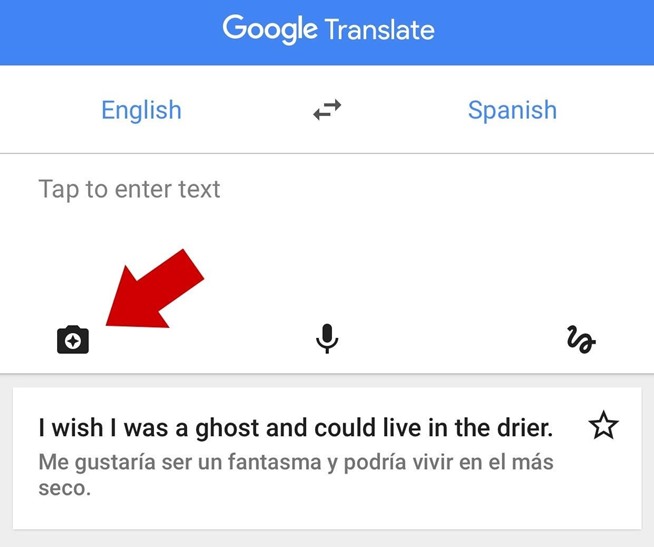
Launch the app on your smartphone to give it a spin, and tap the camera icon, as shown in the image above. The languages default to an English-to-Spanish translation, so if you wish to see something else, just tap the languages up top to change them.

How to Instantly Translate Anything Using Your Smartphone Camera


You will see a screen like the one above when you tap the camera and it will show you what your camera sees. Point it at some words and watch them change right in front of you. Further, tap the red camera button to snap a photo, if you want to save a specific image. That’s it.

Also, you do not need an internet connection for the app to function. Since, Google stores translation files locally on your phone, there is no need for you to sign up for a local data plan and download them when you travel abroad.

Disadvantages

Word Lens is not flawless. While Google resolved that major problem to the original Word Lens app—the cost—it still suffers from the same problem all translation apps do: they are seldom 100% precise.

Take a look at the screenshot above. If you speak Spanish, you might be able to identify that it sounds a little like what you are reading in this article. Also, you will likely notice that especially in the grammar department, the translation is not perfect.

The app will help you can get a general understanding of what you are reading in spite of the errors. So, you should not expect too much and just need to take its strengths into account. Also, you shouldn’t use this live translation feature on a lengthy article. It works best with signs and short blocks of text that you might come across when are outside.

Additionally, it is a very complicated job for a smartphone to do live translation with word replacement. Google Translate will mostly look a little overexcited and jittery when exchanging words because you can never hold your phone completely still. There will be text fluctuation when there is movement. If things are too wobbly in live mode, just snap a picture and you won’t have to worry about it.

On the whole, these disadvantages are significantly overshadowed by the unbelievable usefulness of the app. We are sure to end up with more precise translations and less jittery replacements. However, it’s still pretty unbelievable for now though.

Where to Get It


Google Translate is a free app available for download on iPhone, Android, and Google Glass. To view the download page, you can click those links or can just search the app store on your iPhone or Android to get it directly on your device.
Tech Touchz is a Network about Hacker News, Tech News &Tech Hacks - Latest &Tech News, Hacker News and Hacking Tricks About Technology


HOW TO ADD FLASH TO YOUR FRONT CAMERA TO TAKE PHOTO AT NIGHT

Almost all smartphones including iPhones come with super cameras on the front to take selfies in the day. However lack of flash on front cameras makes it difficult to take good images at night. Here are some Apps which will add flash to your front camera and help you take those beautiful and viral selfies.


How to add flash to your Android smartphone front camera to take photos at night


#1 Front Flash


Front Flash works as the name indicates. This front camera flash app will illuminate your mobile phone screen to brighten up the portion and add those extra lumens at night time.

Add Flash To Your Front Camera To Take Photo at Night


Android smartphone owners can take help of this App to click clear images at night as show in the image above.

#2 Snapchat


All of you probably used Snapchat for its destructible message features. You probably dont know that Snapchat App has a built-in feature to help you take images with front camera at night time.

Front Flash With Snapchat


You can use the Snapchat low-light camera mode, which is symbolized by the moon icon near the camera flash, to take clear images at night.

#3 BestMe Selfie Camera


Here is another dedicated selfie App for your Android smartphones.

Add Flash To Your Front Camera To Take Photo at Night


With this app, you can make changes to your selfie photos and upload it on your social profiles. This is considered as one of the best selfie photo editor app for Android smartphones.

How to add flash to your iPhone and iOS devices front camera to take photos at night


#1 Selfshot – Front Flash Camera


Selfshot is the most popular App on Apple iTunes store which helps you take better photos at night.

Take Selfie in Low Light

Download Selfshot App and use the awesome front-facing camera of your iPhone or iPad to take selfies and videos in dark.

#2 Take Selfies FREE – With Front Flash In Low-Light


This App for your iPhone and iPad helps you to take beautiful selfies no matter how dark it is.

Take Selfie in Low Light with front flash

Take Selfies Free works easily with your front camera, even in low light. This is also the only selfie App with a built in timer so you can get your pose perfect for those awesome social media updates.

#3 Snapchat


Like Snapchat for Android smartphones, Snapchat for iOS devices also provides the feature to take awesome selfies at night.

Front Flash With Snapchat

Snapchat’s low-light camera mode, which is symbolized by the moon icon near the camera flash, is meant to help you take better photos at night or in poor light.

Adding a flash for selfies at night

Another way to take good selfies at night is to add a external flash to your smartphone.


Add Flash To Your Front Camera To Take Photo at Night


Such flash lights for night time selfies are available on Amazon in all countries. You have to buy Selfie Flashlight from Amazon and plug this device to your headphone jack. Using this, you will be able to capture clear selfies at night time on your Android smartphones.
Tech Touchz is a Network about Hacker News, Tech News &Tech Hacks - Latest &Tech News, Hacker News and Hacking Tricks About Technology


I don’t think there’s been a time when people anticipated what the next iPhone would look like, like we do the #iPhone 7. After the release of Samsung’s awesome flagship devices over 2-months ago, many people like me are wondering what on earth Apple can do that’ll truly rival the S7 and S7 edge or trump them all together.

So far, rumors about Apple’s next iPhone range from possible wireless charging, to a water proof feature to the touch screen display with built-in touch ID. All of which won’t be new.

Some iPhone 7 rumours you’d like to hearBut in addition to theses, there are rumors that the iPhone 7 will come in three variants this year. From what I read on the mobipicker, we should be expecting to see an iPhone 7, an iPhone 7 Plus and an iPhone 7 Pro or Plus Premium.


If that’s true, I think Apple is truly getting desperate and they should right? Fewer and fewer people seem to care for an iPhone these days. #personalopinion

With regards to the release date for the next set of iPhones, most still expect that it’ll be released in the 4th quarter of 2016, which would be following its normal pattern of phone release since the release of the 4S.

To sum it all up, Apple’s CEO, Tim Cook has promised to give the world a surprise, he further said the phone will be equipped with features we can’t do without and we never knew we needed. I wonder seriously what that could be.
Tech Touchz is a Network about Hacker News, Tech News &Tech Hacks - Latest &Tech News, Hacker News and Hacking Tricks About Technology
It's the season for iPhone 7 leaks and the forecast is for minimal changes - the phone will be the same size, but the antenna setup has been redesigned.

You can see the new design in this leaked photo. There's just the one camera - the two-camera setup is reserved for the Plus models. This is the Gold color option, by the way, I know the colors of the photo are off, but it is.

Apple iPhone 7 in Gold (leaked photos)


Then there's this alleged photo of the retail box. It's particularly blurry, but you can still make out the text - "iPhone 7 Rose Gold 64GB."

Alleged photo of the iPhone 7 retail box (64GB Rose Gold model)
I guess it's good news that it's not 16GB, leaving a sliver of hope that Apple will finally upgrade the base storage on its phones. Fingers crossed.
Tech Touchz is a Network about Hacker News, Tech News &Tech Hacks - Latest &Tech News, Hacker News and Hacking Tricks About Technology


Apple’s iPhone 7 Plus will reportedly have two rear cameras and 3GB RAM

If you thought iPhone 6s Plus was powerful, you obviously have not been paying attention to the upcoming iPhone 7 Plus, and thanks to a KGI securities analyst, the upcoming phablet from Apple is going to feature hardware that will dwarf its predecessors by miles.This is because the upcoming iPhone 7 Plus is rumored to feature 3GB of RAM. Though more amount of RAM will obviously equal more battery consumption, we have a feeling that Apple will reduce this drawback through a large battery capacity.


However, 3GB RAM is not the only impressive hardware spec that is going to be present inside the upcoming beast of an iPhone. iPhone 7 Plus has also been rumored to feature a dual-camera processing sensor, and if the rumor holds true, this iPhone is going to be the very first phone belonging to Apple to feature such a configuration.

While we do not know the true capabilities of this sensor, it will probably have to do with creating a final image that is going to be far more separated from the background compared to the other camera sensors. Android smartphones have featured dual-camera sensors before to create 3D images, so it is possible that an iPhone 7 Plus will provide such an addition too.

Details of what else the camera will be capable of delivering are pretty bleak, but knowing Apple, they always end up cramming something different inside the next iPhone every year so we can also hope that the default camera app is going to get better software to allow more control to the user who wants to capture images and footage frequently.

More information will obviously be revealed when the iPhone 7 Plus is unveiled during the month of September so all updates regarding the complete hardware specifications are going to be detailed at that time.
Tech Touchz is a Network about Hacker News, Tech News &Tech Hacks - Latest &Tech News, Hacker News and Hacking Tricks About Technology

instagram logo

Instagram has announced a big update for its mobile apps today

This affects users on both Android and iOS, and the newest version of the app should have already been offered to you as an update through theiOS App Store or the Google Play Store.
The first thing you'll notice once you install the new iteration is that the app has a different icon. Instagram has gone through a lot of ideas until it settled on the colorful new logo you can see below.

Not only the main Instagram app has received a new icon - the same treatment has been applied to Layout, Boomerang, and Hyperlapse, the other three mobile apps developed by the Facebook-owned photo sharing social network.

In the Instagram app itself you should also see a new design at some point, though this doesn't seem to automatically appear once you have the newest version, so it's probably a server-side switch which is getting a staged rollout. When the new UI does land on your device, you'll notice it's much simpler and much more devoid of blue than the old one.

The top and bottom of the app are now white, and the icons in the bottom navigation bar seem to have gotten smaller than they used to be.

Instagram says 80 million photos and videos are shared through its network every single day, and this updated look "reflects how vibrant and diverse" the "storytelling" on the service has become.
Tech Touchz is a Network about Hacker News, Tech News &Tech Hacks - Latest &Tech News, Hacker News and Hacking Tricks About Technology

Talk to Amazon’s Alexa from your iPhone with this Lexi app

                        Lexi App lets you talk to Amazon’s Alexa from your iPhone

BlueToo Ventures has just released a new iOS app Lexi that now brings Amazon’s digital assistant Alexa to the iPhone. This app allows you to bypass Amazon’s Echo smart speakers and give a verbal command.

In other words, the iOS app mirrors the way Amazon’s personal assistant functions. It can be used to control the Echo speaker, which essentially means users can control smart devices, place orders as well as install and turn skills from the Alexa App. Further, Lexi also allows users to ask Alexa for information about the latest news, weather, movies or directions to the closest hospital, for instance. However, some features like Amazon Prime Music and audio books, still require the Echo hardware.

   
 While users are required to have an Amazon account to sync, there is no need to buy an Echo, or any other third-party speaker with Alexa integration, such as the recent Triby. Using the app is very simple. All you need to do is just press and hold the screen while making a request, and then release to hear the confirmation response.

At present, Lexi is available for iOS only on App Store for $5, which is a grab-on offer compared to the $180 you would have to pay for the standard Echo speaker.

SOURCE Lexi Apple App Store
Tech Touchz is a Network about Hacker News, Tech News &Tech Hacks - Latest &Tech News, Hacker News and Hacking Tricks About Technology

Apple recovers $40 million worth of gold by recycling old iPhones/iPads

Apple’s iOs recycling efforts yield $40 million worth of gold from old devices

You probably know that Apple uses gold in manufacture of iPhones. What you didnt know that Apple was able to salvage nearly $40 million worth of gold from recycled iPhones. Apple has released its latest annual environmental report yesterday which reveals that Apple was able to recover some valuable (I mean really valuable) minerals from recycling its old products.

A report by Business Insider notes that Apple was able to recover over 61 million pounds of steel, aluminum, glass, and other materials from its computers and iPhones. The most valuable of them was of course, Gold. Apple was able to recover 2,204 pounds of gold, which is well over a ton.

Environmentalists will be happy with the commendable efforts by Apple in recycling has allowed it to actually recover a whopping 2,204 pounds of gold from old devices, which is worth approximately $40 million on the open market today. While Apple may be worth billions and billions of dollars, $40 million is still not a small amount by any means that too from recycling iPhones.

Recovering gold from old iPhones is one thing, but Apple also managed to harvest around 3 million pounds of copper that is worth $6.4 million, as well as 4.5 million pounds of aluminum that amounted to $3.2 million.

Such efforts are needed to be implemented by other companies like Samsung, LG so that we can make earth a nice place to live and also preserve scarce resources.
Tech Touchz is a Network about Hacker News, Tech News &Tech Hacks - Latest &Tech News, Hacker News and Hacking Tricks About Technology
China is now #2 in iOS revenue, behind the U.S.

Earlier this year, app store analytics firm App Annie predicted that China could overtake both the U.S. and Japan in terms of revenue generated from iOS applications as soon as this year. The year isn’t yet half over, but that prediction appears to be on its way to coming true: China has just moved past Japan to now score the number two position for iOS revenue – up from third place back in January.


The country was already the leader in terms of iOS downloads, a spot it acquired in Q1 2015 following growth in the market influenced by adoption of Apple’s larger-screened devices, the iPhone 6 and 6 Plus. Prior to that, in 2014, China had been the second-largest country for iOS downloads.

But getting apps onto users’ devices and generating revenue from those apps are two totally different things. That’s obvious, too, when you compare iOS downloads and revenue with those from Google Play, for example. Last year, Google Play downloads were 1.5 times that of iOS downloads, but Apple’s App Store still leads in revenue.
Screen Shot 2016-04-15 at 11.34.04 AM


According to App Annie, China’s iOS revenue growth grew nearly 2.2 times from Q1 2015 to Q2 2015. This growth is being contributed to in-app purchases, however, not paid app downloads. It’s also almost entirely driven by games – and not just games in general, but several very specific titles, says App Annie.

A handful of core games are helping to contribute to the revenue growth, including Fantasy Westward Journey, Westward Journey Online, Hero Moba, and The Legend of Mir 2.
However, while games are driving the growth for the time being, App Annie notes that games are often a signal of larger trends to come.
Screen Shot 2016-04-15 at 11.34.15 AM

That said, because of the revenue these and other titles are generating, China also passed Japan in iOS Games revenue in addition to Overall iOS revenue.

So how close is China to grabbing the number one spot for iOS revenue? App Annie says the U.S.’s lead is still wide – a sizable 30 percent, in fact. But if China’s App Store revenue continues to grow at the same pace, it’s on track to pass the U.S. in the “coming quarters.” This year, perhaps.
Tech Touchz is a Network about Hacker News, Tech News &Tech Hacks - Latest &Tech News, Hacker News and Hacking Tricks About Technology

Apple orders 100 million Samsung OLED panels for the 2017 iPhone

According to the latest rumors, Apple has made an order to Samsung for 100 million 5.5" OLED panels in 2017. The displays are supposedly going to make their way to the 2017 iPhone Plus. The timing for the order indicates that the OLED screens will skip the iPhone 7 and only make it to the iPhone 7S.


The information comes from a source cited by the Chinese edition of the WSJ and it also points out that Samsung has set aside a production line at its Asan plant for the order. While the information about future iPhone models using a Samsung-made OLED panel is not new, it was previously anticipated to happen in 2018, not a year earlier.
Apple orders 100 million Samsung OLED panels for the 2017 iPhone

KGI's analyst Ming-Chi Kuo, who has a mixed track record regarding Apple rumors, also shares similar information. However, he is quite certain that the 2017 iPhone Plus will have a 5.8" display.

The reason for Apple's decision to go OLED could be because currently, its production cost is lower than LCD's. It'll be also interesting to see if rumors surface regarding Apple issuing a request to LG to manufacture OLED panels as a fallback. Up until now, the Korean company has been a key Apple partner in making panels for the iPhone.